



John Redhead
Participant
April 22, 2021
Answered

Export Whole Canvas

  • April 22, 2021
  • 6 replies
  • 5282 views

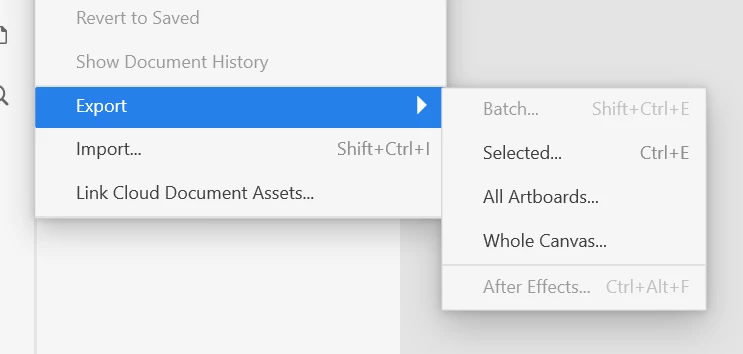
Hi everyone. In the latest build of XD (39.0.12) the Export Whole Canvas has been removed from the export Menu Item, which was still there in (38.1.12). I found this useful to create an overview for clients, along with the individual artboards. I'd have text on the pasteboard next to canvases. Just became a lot easier than exporting individual artboards to illustrator and then position them. to give that overview.

 

This topic has been closed for replies.
Correct answer HARSHIKA_VERMA

Hi All,


There is a quick update on this feature. This feature was experimental and unintentionally made available before being ready for our quality and user experience bar. We're evaluating it for the future, but in the meantime we recommend using prototype sharing instead.


We apologies for any inconvenience.


Thanks,

Harshika

6 replies

Known Participant
November 10, 2023

The easiest way I've found is to copy all and paste it into Photoshop.

max4u
Participating Frequently
September 15, 2021

Hi everybody,

there is a plug-in that helps out – it's called Merge Export and something in chinese which is of course hard to understand 😉 but that doesn't matter.

Just open your XD-file and click the blue button (whatever it says) without having any of your artboards marked.

It then merges all your artboards to one big one you then can export. It worked with SVG and PDF (if you stay within the range of a PDF), png and jpg might fail if the file is too big.

Cheers,

Max

Rishabh_Tiwari
Community Manager
Community Manager
September 15, 2021

Hi there,


Thanks for reaching out and sharing your findings. I am sure this will help other community members. Feel free to participate if you have any other suggestions or feedback.


Regards

Rishabh

HARSHIKA_VERMA
Community Manager
HARSHIKA_VERMACommunity ManagerCorrect answer
Community Manager
August 25, 2021

Hi All,


There is a quick update on this feature. This feature was experimental and unintentionally made available before being ready for our quality and user experience bar. We're evaluating it for the future, but in the meantime we recommend using prototype sharing instead.


We apologies for any inconvenience.


Thanks,

Harshika

Known Participant
July 13, 2021

Just realised this with version 41.1.12.9 ... frustrating. Any reason for this? Removed because of a security issue or a bug? Any workarounds? Maybe Overflow [1] could help ... but, with extra costs. Alternatively, writing a customised plugin [2] might help. Let's see what version 42 brings these days.


[1] https://overflow.io/

[2] https://adobexdplatform.com/plugin-docs/reference/scenegraph.html

Known Participant
July 30, 2021

Still not available with version 42.0.22.11 ... Has this feature been removed on purpose, or caused by a bug?

martini23646994
Participant
June 23, 2021

It's really annoying that this feature was removed. I have a storyboard for my clients that I want to review the flow for, but exporting individual artboards is totally useless for this. Please bring this feature back as it's basic UX design to be able to review how things flow with clients, and not using the click each artboard way it's limited to now.

John Redhead
Participant
June 24, 2021

I totally agree. It becomes a bind to individually export each artboard, and import them into Illustrator, especially if there are changes made, which you then need to re-export and re-import into illustrator. It was a simple matter of putting notes and lines on the canvas and then cropping the export from XD if needed.

elegant_leader5EE4
Community Manager
Community Manager
April 23, 2021

Hey John,


Hope you and your family are doing good during this pandemic!!


We are really sorry for the issue you are seeing and thanks for highlighting it. We have logged a bug for this to engineering team. We will fix this as sson as possible and you might again get this option in future releases.


Thanks,

Nawneet

Participant
May 14, 2021

Hi,


this problem still persists in Version 40.0.22. No Export Canvas Option to be found.

Please fix this issue. Thanks!


BR

Stefan