
Participant
February 1, 2022
Answered

Exporting Assets/Images at different sizes 1x, 2x & 3X

  • February 1, 2022
  • 1 reply
  • 2703 views

Hello Adobe Commuity!


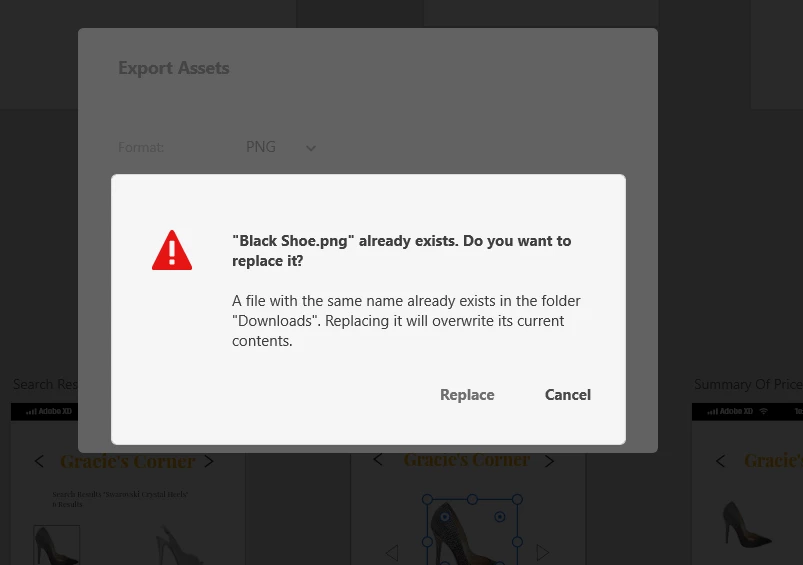
I having trouble exporting my assets in XD for handoff for the developers. When handing off assets, the sizes have to be 1x, 2x & 3x! But for some reason, when every I try exporting the file, It ask me to override it the previously save file size. I will save it as 1x but when I try exporting 2x, I get the msg in the screenshot. Have anyone else seen this message in XD ??? Please help


    This topic has been closed for replies.
    Correct answer AkinGn

    Hi @veronica365 , as seen in this conversation: https://community.adobe.com/t5/adobe-xd-discussions/exporting-assets-artboard-size/td-p/11296718 you can use this tutorial to learn more about exporting assets, I usually share the prototype under the share tab by selecting "Development" under the "View Setting", and checking the "Downloadable Assets" lets developer to download whichever asset s/he wants by clicking on it while viewing the prototype and tapping the "download" button, it downloads the selected image/asset in two sizes by default (1x and 2x).  You can try this test prototype (just with an image 🙂 https://xd.adobe.com/view/2aba8df6-e06e-43f7-b260-066a71ab4faf-7fe9/specs/ Hope this helps!

    1 reply

    AkinGn
    Community Expert
    AkinGnCommunity ExpertCorrect answer
    Community Expert
    February 1, 2022

    Hi @veronica365 , as seen in this conversation: https://community.adobe.com/t5/adobe-xd-discussions/exporting-assets-artboard-size/td-p/11296718 you can use this tutorial to learn more about exporting assets, I usually share the prototype under the share tab by selecting "Development" under the "View Setting", and checking the "Downloadable Assets" lets developer to download whichever asset s/he wants by clicking on it while viewing the prototype and tapping the "download" button, it downloads the selected image/asset in two sizes by default (1x and 2x).  You can try this test prototype (just with an image 🙂 https://xd.adobe.com/view/2aba8df6-e06e-43f7-b260-066a71ab4faf-7fe9/specs/ Hope this helps!

    Participant
    February 1, 2022

    Thanks for your reply. I figured it out. 

    HARSHIKA_VERMA
    Community Manager
    Community Manager
    February 4, 2022

    Glad to hear you're able to resolve the issue, veronica365. Could you please share the solution that worked for you which might help our customers hit the same issue?


    Thanks, Akin for sharing the workflow.


    Happy Friday!


    Thanks,

    Harshika