
Participating Frequently
August 18, 2020
Answered

Exporting vector icons to PNG, 3X is exported 100% instead of 300%

  • August 18, 2020
  • 2 replies
  • 519 views

I'm having a problem exporting vector shapes to png at 3x. For some odd reason, 3x results in 100% instead of 300%, 2x smaller, 1x reduced to tiny for no use.  On my design file, the ideal size is 16x16. I want 48x48 at 3x. I tried with many different objects. One arrow purely made of a path exported correctly, but all icons were reduceded is size. What am I doing wrong?
This topic has been closed for replies.
Correct answer Spas K.

Hey, I suspect what you might be doing wrong, as I remember being confused about it as well.

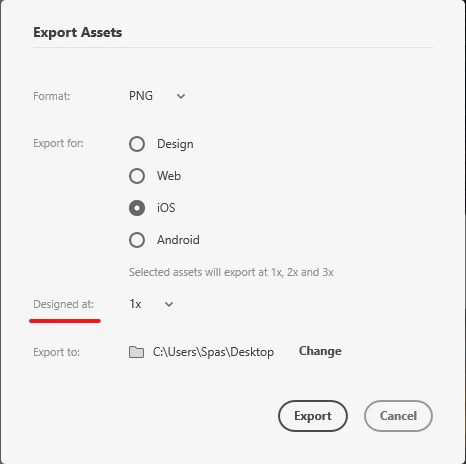
When you are exporting, there is a setting called "Designed at". This, as it states, is asking what resolution you are designing at. 


Let's say you select "3x". This means, that your design is already at 3x. So then the program divides that and generates the 1x and 2x, which are the smaller resolutions, from that 3x. This option is useful if you have a lot of raster graphics that need to be exported, as in that situation you would be working with the highest resolution naturally.


In your case, you should keep that at 1x. This means that the software is going to generate the bigger 2x and 3x resolutions on export.


2 replies

Rishabh_Tiwari
Legend
August 19, 2020

Hi there,


Thanks for reaching out. In addition to what Spas suggested, for more information, you can refer to this article: https://medium.com/thinking-design/protip-exporting-assets-in-adobe-xd-c586996de703


Let us know if this helps or if you need any further assistance.


Regards

Rishabh

Spas K.
Community Expert
Spas K.Community ExpertCorrect answer
Community Expert
August 19, 2020

Hey, I suspect what you might be doing wrong, as I remember being confused about it as well.

When you are exporting, there is a setting called "Designed at". This, as it states, is asking what resolution you are designing at. 


Let's say you select "3x". This means, that your design is already at 3x. So then the program divides that and generates the 1x and 2x, which are the smaller resolutions, from that 3x. This option is useful if you have a lot of raster graphics that need to be exported, as in that situation you would be working with the highest resolution naturally.


In your case, you should keep that at 1x. This means that the software is going to generate the bigger 2x and 3x resolutions on export.