

P1XE1_PUSHER
Participant
June 6, 2022
Answered

File name on the "Home" screen is overwritten in XD

  • June 6, 2022
  • 2 replies
  • 357 views

I was presened first with a conflict between an old file I had and it's cloud counter part. The file had an exclamtion point on it's card next to the thumbnail. So I opened i to try and resolve the conflict or save a new version. After taking the time to open it displaid explanation text of the error. then when I clicked okay. It popped up a notification saying there was a problem with the file and it closed the just opened file without giving me recourse. Now I have this on my home screen in the first slot. The thumbnail is a file i'm actively working on and i was able to open it without any problem. 
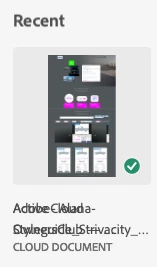
<Title renamed by moderator>

This topic has been closed for replies.
Correct answer P1XE1_PUSHER

Yeah, I'm not worried about fixing it. Clearly turn it off and back on again would /did solve the problem. My point in posting this was informing the developers of a bug. Please don't sweep this under the carpet with a tech support post and think it's done. Devs should fix the root problem of not clearing the card space after a file has been removed from the card list. This is sloppy coding and should be resolved. 

2 replies

HARSHIKA_VERMA
Community Manager
Community Manager
June 7, 2022

Hi @P1XE1_PUSHER,


We are sorry for the trouble. Would you mind confirming if you've tried signing out of XD and Creative Cloud Desktop app, restart the machine, and then launch XD from the Creative Cloud desktop app?


Let us know if that helps.


Thanks,

Harshika

P1XE1_PUSHER
P1XE1_PUSHERAuthorCorrect answer
Participant
June 8, 2022

Yeah, I'm not worried about fixing it. Clearly turn it off and back on again would /did solve the problem. My point in posting this was informing the developers of a bug. Please don't sweep this under the carpet with a tech support post and think it's done. Devs should fix the root problem of not clearing the card space after a file has been removed from the card list. This is sloppy coding and should be resolved. 

HARSHIKA_VERMA
Community Manager
Community Manager
June 16, 2022

Sure. We completely understand your concern. We'll make sure to pass on your feedback to the team to make improvements in the future.

For investigation, the team would require some details of your machine-


We will try our best to help.


Thanks,

Harshika

P1XE1_PUSHER
Participant
June 6, 2022

So I guess this is a bug report?... couldn't add it to Uservoice.