
Participating Frequently
November 23, 2021
Question

File Syncing error, please help me out

  • November 23, 2021
  • 3 replies
  • 1386 views

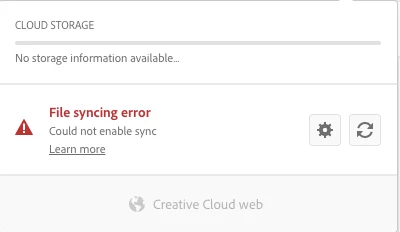
File Syncing error, I could not share with our customer I tried below steps but still it's not working 

1. sign out, then sign in again.

2. Changed folder location.

3. Re-started my Mac

please help me how to resolve this issue
 

This topic has been closed for replies.

3 replies

Participant
November 23, 2021

Hi Mohamed 

Well i ve got that issue a lot, so i think you should try what i do when that happens:


Sign out from CC, go to " Actibity Monitor" on your mac, then force to quit every Adobe item you see there, after thats done, restart you mac and sign in in CC again!

Hope its helps,

Best,

Mariana 

Participating Frequently
November 23, 2021

Thank you Mariana for your suggestion I tried but it doesn't work.


Participating Frequently
November 24, 2021

Hi 

Please help me how to resolve this issue 

Participating Frequently
November 23, 2021

Thank you, for quick response

I tried although you suggested steps still doesn't work, please find the below screenshot


Participating Frequently
November 23, 2021

 Hi Chethan, 

Any Updates on my request


Regards 

MD

Community Manager
November 23, 2021

Hi There,


Thanks for sharing the details and trying the steps. After looking into the screenshot, It looks like the Adobe Creative Cloud Sync is not in sync, Could you please try uninstalling adobe creative cloud and its its process by using CC cleaner tool: https://helpx.adobe.com/creative-cloud/kb/cc-cleaner-tool-installation-problems.html and again Installing latest creative cloud and let us know if this works. Also I asked for the  screenshot of the About Creative cloud info page, please can u share that by clicking on Creative cloud-about creative cloud(refer screenshot).


Regards

Chethan 

Community Manager
November 23, 2021

Hi There,


Thank you for reaching out and sorry to hear that you're having trouble in using XD .Could you please try the steps shared below:

  1. Please ensure that your creative cloud and Adobe XD are up to date.
  2. If you are already on the latest version of XD, please try the steps shared below:
  • Sign out of XD and CC desktop app.
  • Close CoreSync and all Adobe-related processes from the Task Manager/Activity monitor.
  • Reboot the computer.
  • Sign back in on the CC Desktop app and launch XD from there and check if you are able to open the file or not.


If it still doesn't work, please share a screenshot of the About XD and About Creative cloud info page.


Regards

Chethan G