
Participating Frequently
June 16, 2020
Answered

Fixed position no usable

  • June 16, 2020
  • 2 replies
  • 1402 views

Hello,


I can't use the "fix position" check box in the Prototype tab. I see an option "fixed deflection position" under Action but it is grayed out and I cannot use it.

I would like to fix a Nav bar at the bottom of the page and that it does not move during the scroll.

Am i wrong somewhere?
How to do ?
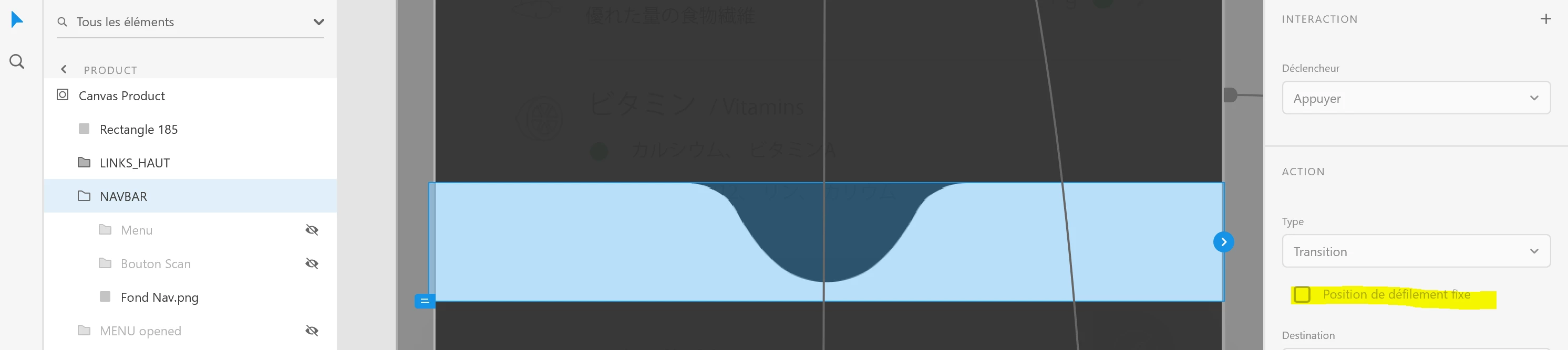


Thank you for your help!


    This topic has been closed for replies.
    Correct answer Kenneth Kawamoto

    NAVBAR is a group and is inside a Canvas. Is that wrong?


    It's not wrong but you cannot make it pinned if it's inside of a group. If you ungroup "Canvas" then you should be able to pin NAVBAR

    2 replies

    Community Expert
    June 17, 2020

    That's not Fix Position When Scrolling checkbox, but Preserve Scroll Position checkbox. Shouldn't it say conserver la position de défilement instead, HARSHIKA VERMA? What does the checkbox at the bottom say?

    Participating Frequently
    June 23, 2020

    Hello,


    May I ask for some help please?

    I changed the language to english, but when I select the NavBar folder on "Prototype", "Scrolling"  function doesn't appear.

    Community Expert
    June 23, 2020

    That's because your element is inside a group.

    HARSHIKA_VERMA
    Community Manager
    Community Manager
    June 16, 2020

    Hi there, 


    We are sorry to hear you are having trouble in fixing the position of the Nav bar in XD. It looks like you're trying to use the "Preserve Scroll Position" in Prototype mode. If so, I would suggest you to click on the arrow to trigger an action on the object and you will see that option became available immediately.


    Please let me know if I misunderstood your question. We will try our best to help.


    Thanks,

    Harshika

    Participating Frequently
    June 17, 2020

    Hello Harshika,


    Thanks for your reply! You're right, I have to click on the blue/white arrow to make it active.

    But, doesn't works...


    I would like the Navbar to stay at the bottom of the screen when I scroll down / up.
    When I click on the "play" button, the navbar scrolls with everything else.
    However, I seem to have followed the instructions in this tutorial but I do not have the "Scrolling" function. I specify that I am in the "Prototype" tab and that the group is well selected.

    Did I forget something?