
Participant
March 23, 2022
Answered

Flashing button transition adobe Xd

  • March 23, 2022
  • 3 replies
  • 653 views

Hi all

so ive spent all afternoon messing with this and cant understand why its happening. Auto-animate between hover state and toggle state on a button keeps flashing a white square. The strange thing is that it doesnt happen when toggling again from the hover state to the default state. I can only think that it has something to do with the interaction between a hover state and toggle state. Any help would be grand.

Here is an example
https://xd.adobe.com/view/fb1f12bc-6316-415f-90a6-80a72e1ad9ec-ae4c/?fullscreen
    This topic has been closed for replies.
    Correct answer Spas K.

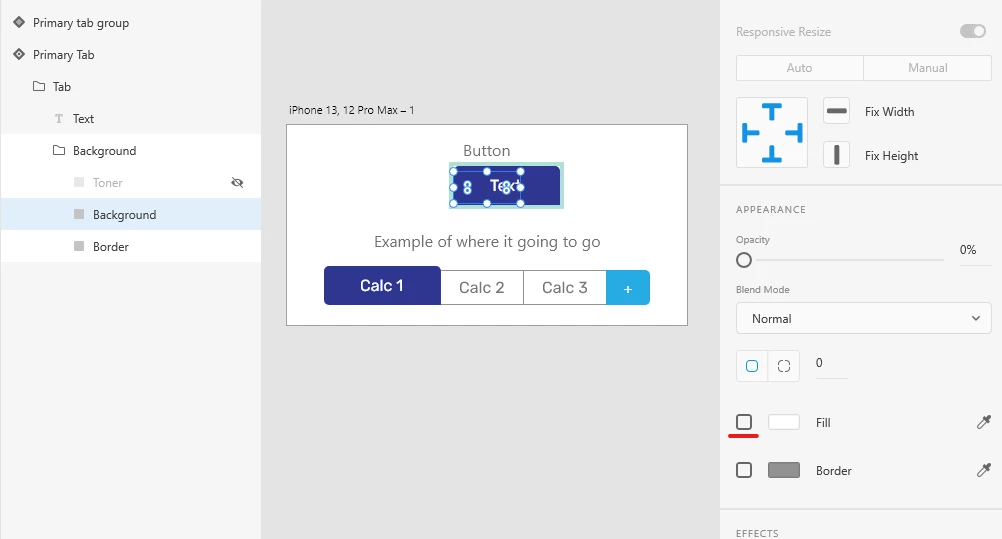
    So, to fix your issue, uncheck the fill color of the "Background" layer in your toggle state.


    Problem is that from Hover to Toggle states, your background goes from 100% opacity and blue color to 0% opacity and white color. Because some shortcomings of Xd, the fill color instantly switches to white, while the opacity slowly goes to 0%. At the same time the border becomes the big blue rectangle, so at some point the background is on top of it, is completely white, but has not yet reached 0% opacity, which is where you see the white "flash". If you disable the fill color completely in the toggle, it goes away as soon as you click and you don't see the flashing.

    3 replies

    ExaAJAuthor
    Participant
    March 23, 2022

    As suggested by someone in the comments here is the Xd file if someone wants to have a mess around and figure it out for me =P

    https://ufile.io/t0o5l0wv

    Spas K.
    Community Expert
    Spas K.Community ExpertCorrect answer
    Community Expert
    March 23, 2022

    So, to fix your issue, uncheck the fill color of the "Background" layer in your toggle state.


    Problem is that from Hover to Toggle states, your background goes from 100% opacity and blue color to 0% opacity and white color. Because some shortcomings of Xd, the fill color instantly switches to white, while the opacity slowly goes to 0%. At the same time the border becomes the big blue rectangle, so at some point the background is on top of it, is completely white, but has not yet reached 0% opacity, which is where you see the white "flash". If you disable the fill color completely in the toggle, it goes away as soon as you click and you don't see the flashing.

    ExaAJAuthor
    Participant
    March 23, 2022

    You my friend are a genius. Thank you so much. This would of kept me up all night.

    Spas K.
    Community Expert
    Community Expert
    March 23, 2022

    It would be great if you can share the .xd file (upload somewhere and post the link here), so we can take a look and see if something is misconfigured. Most likely some element from the hover state is returned to its initial state before it is hidden in the toggle, or is missing in the toggle state, so Xd doesn't know what to do with it.

    ExaAJAuthor
    Participant
    March 23, 2022

    Any suggestions where I could upload it to? Ive tried uploading it here to the forums but it gives me this error:


    The attachment's example.xd content type (application/octet-stream) does not match its file extension and has been removed.

    Chris W. Griffith
    Community Expert
    Community Expert
    March 23, 2022

    I recorded the interaction and can see it. Maybe seeing this image might give a clue to an element that exists in the states?