
Formating Paragraph Line Spacing in Area Text
I'm magazine creative director for 20 years and now I'm venturing into UI/UX waters.
Since I am used to InDesign and its way of controlling and formatting, Adobe XD creates some problems for me.
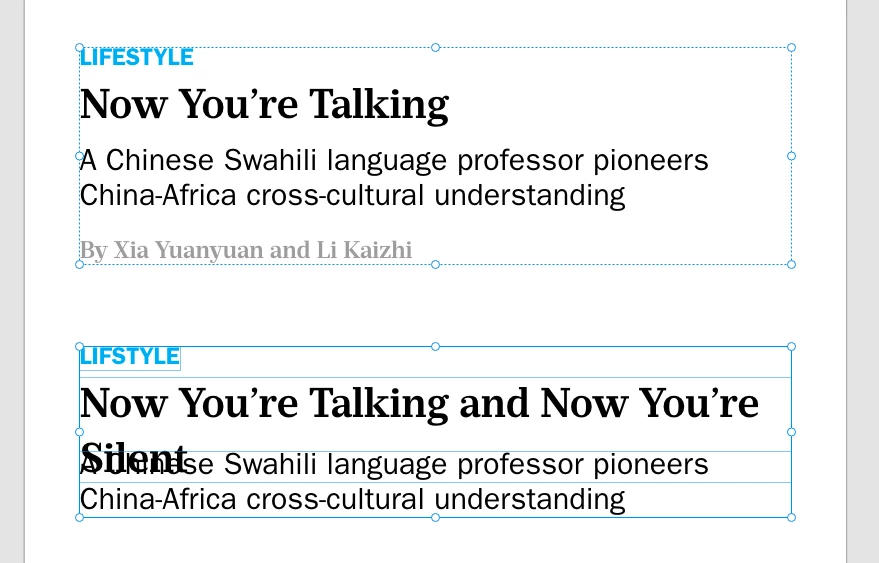
In the pictured example, I have a Text area. Each text paragraph is formatted in its own style. Running head at the top, headline, subhead, and author. Each with its own formatting. Unfortunately, XD does not allow separate Line spacing formatting for each paragraph.
In the bottom part of the picture, I can achieve it by separating each paragraph into its own Point or Area text. Then I can format Line Spacing for each paragraph.
But this creates a problem. What if a headline is 2 or 3 lines long.
In the first example, if all of the paragraphs are in the same Area, longer headlines will push down the text below.
In the bottom part, if the headline is too long it will overlap the part below.
For me proper typography and formatting are essential.
How to achieve text elements to be separately formatted (Line spacing) while remaining in one text area?
Because keeping all these texts in one text area seems a much better solution, especially because it is easier to control the distances between paragraphs.
thank you


 AdChoices