
Inspiring
January 18, 2019
Answered

Gradient masking photo in XD

  • January 18, 2019
  • 3 replies
  • 44812 views

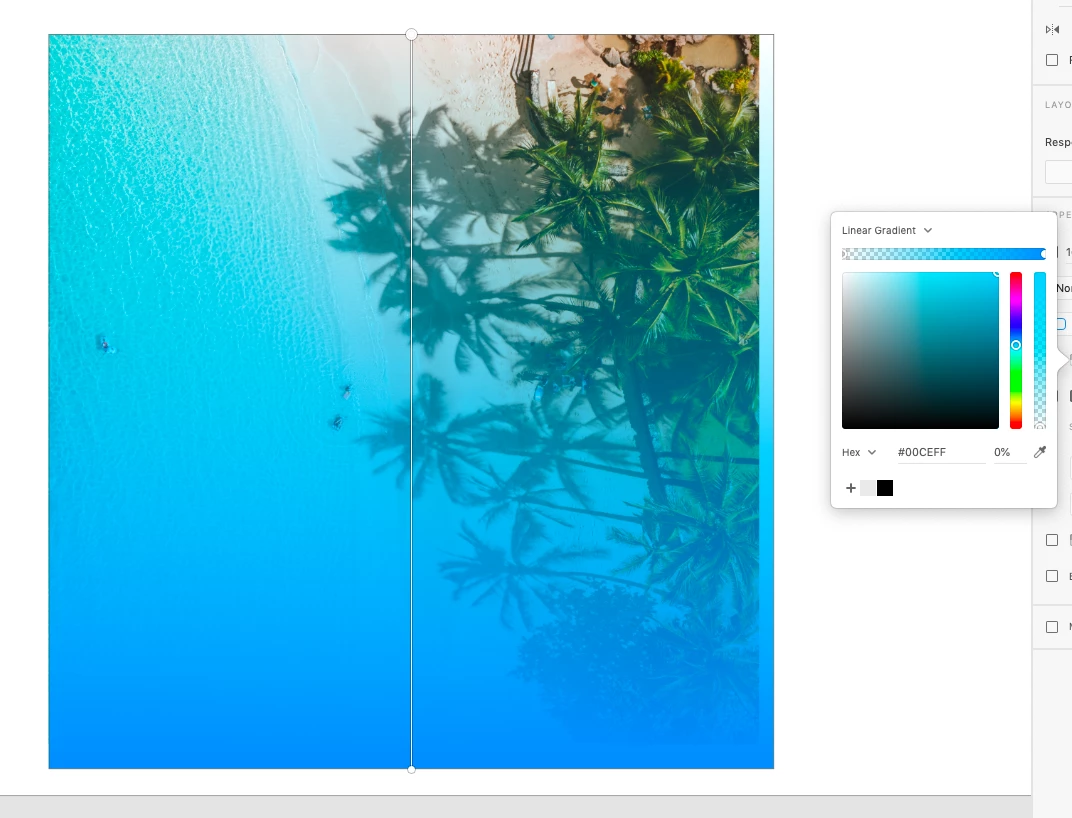
I trying to create my first website layout in XD. Since PS CS2 I was doing all work in Photoshop so it is realy hard to switch my brain   Now it's time for XD but I got first problem I need to create effect like you can see below. So I need to use gradient masking... but is it possible in XD? And if it's not do I have to use Photoshop first to create this, and then import banner to XD? I really want to switch from PS but so far I see many limits when using XD.

This topic has been closed for replies.
Correct answer Wolfgang.H

If I understand the question, it's actually even easier than that.  You don't need a mask or boolean or anything.  Just drop a rectangle on top of your image, then set the linear gradient on that rectangle such that one side of the gradient is full opacity, and the other side is 0% opactiy.  Then tweak settings and positioning of gradient until you like it.  Done!

3 replies

Wolfgang.H
Wolfgang.HCorrect answer
Inspiring
December 11, 2020

If I understand the question, it's actually even easier than that.  You don't need a mask or boolean or anything.  Just drop a rectangle on top of your image, then set the linear gradient on that rectangle such that one side of the gradient is full opacity, and the other side is 0% opactiy.  Then tweak settings and positioning of gradient until you like it.  Done!

Known Participant
July 14, 2022

Much like the original post, I am trying to achieve the same effect, however, the background is not 1 flat color or gradient it's blending an image on top of a pattern.. Is there no way to do a gradient mask? I seem to be only able to mask to a boolean-style shape mask.

HARSHIKA_VERMA
Community Manager
Community Manager
July 14, 2022

Hi @nintenjo,


Thank you for reaching out. We would like to confirm if you're trying to create the below effect over an image.


If so, then you can achieve this by creating multiple "Color stops" in the gradient as shown below:-


You may also check this article: https://helpx.adobe.com/in/xd/help/gradients.html, which might help you.

Let me know if I misunderstood your question. I will try my best to help.


Thanks,

Harshika

handpaintedstudio
Known Participant
October 28, 2019

Hey BryanPS,

I thought I'd give a fresh look at this attempting to 'mask an email with a gradient' or having an image fade.  

I particularly use this method:

  1. Group your image and an object.
  2. Apply a 'black & white gradient' to your object. Adjust the gradient to have black set to 100% opacity nott one end and a white nott on the other end set to 0% opacity.
  3. Arrange your black & white gradient object below the image layer.
  4. Here's the magic, adjust your image layer to 'screen'.
  5. Boom! Now you'll have a gradient alpha gradient masking for your image.
  6. Optional Step: You can create a new object set to white and apply it to the bottom of your group layers.

Note: This can be used for images or more complex masking needs if you want to use any black and white image or alpha image.

Participating Frequently
February 2, 2020

What about exporting the image. 
For example, I have a gradient on the image, but when I export the image I don't want the gradient applied, as that should be done with CSS by convention and best practices. 

What's my best course of action for getting my asset to my developer without the gradient applied, so that the developer can add the gradient via CSS?

handpaintedstudio
Known Participant
February 6, 2020

If you want the deceloper to use css, I would just export the image layer, or rather send the image to the developer. Plus, send the example to the developer how you'd like it to be when coded and live for the site.

developing sites I typically ask for the image and the example so that when I develop I know exactly what the customer is wanting.


However, css gradients aren't supported on all browsers, namely iE7 etc. It would be best to use two images. The developer could stack the images and the top image could be a alpha image like a png with transparency. The transparency would be from the gradient mask created.

Atul_Saini
Community Manager
Community Manager
January 21, 2019

Hi BryanPS

Thanks for using Adobe XD, you may use the steps mentioned here to mask the objects in Adobe XD Combine objects using Boolean operations and mask objects with shapes in Adobe XD and use Gradient fill with to get this kind of effect. You may also import assets from Adobe Photoshop CC as mentioned here- Bring assets from other applications into Adobe XD.

Please update this discussion in case you need further assistance.

Thanks,

Atul_Saini