Inspiring
June 1, 2018
Answered

Graphic bounding box margin

  • June 1, 2018
  • 1 reply
  • 823 views

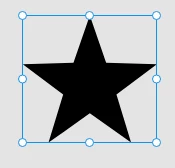
When I copy a vector object from illustrator to XD, sometimes I get this margin you can see at the bottom of the small outlined star here, so when I export that as a pdf for instance those margins gets included, and that is not as intended. The moment I try to pull it up in the bottom part it skews my object. The big star is also copied directly from illustrator but the bounding box surrounds the object with no margins as expected.

What is happening here? I can't find any way to correct this bounding box margin.

    This topic has been closed for replies.
    Correct answer Randy Edmunds

    Open the Layers Panel to see what actually was imported. Maybe it's a Group with another element expanding the bounding box.

    If it's only Path element, then double-click on the border to enter Path edit mode to see exactly where the points are.

    HTH,

    Randy

    1 reply

    Randy Edmunds
    Adobe Employee
    Randy EdmundsCorrect answer
    Adobe Employee
    June 1, 2018

    Open the Layers Panel to see what actually was imported. Maybe it's a Group with another element expanding the bounding box.

    If it's only Path element, then double-click on the border to enter Path edit mode to see exactly where the points are.

    HTH,

    Randy

    perrybrusAuthor
    Inspiring
    June 1, 2018

    Nothing in the layers panel explains why this vector objects is surrounded by a bounding box generating a margin like this. The border attributes doesn't affect this either. Yet another XD bug?