

Participant
Apr 23, 2020 2:30 AM UTC
Answered

Graphic turns black when I drag in from cc libraries

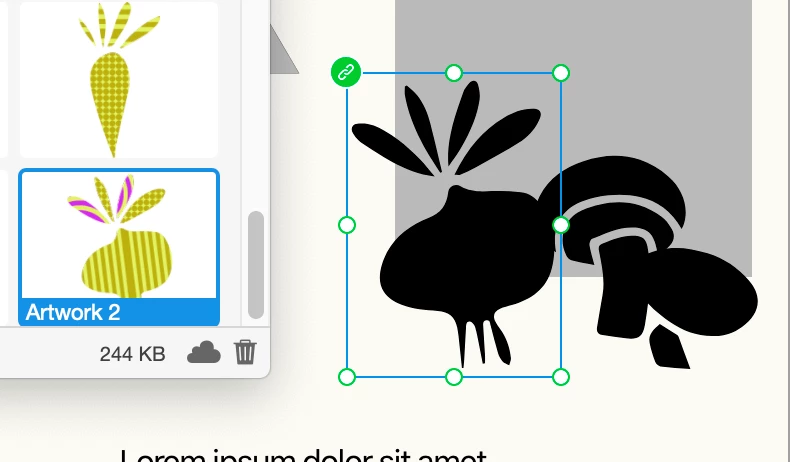
I have graphics with lots of colors made in illustrator that I put in my cc libraries. When I drag each from my cc libraries in XD, the graphic turns black. Help.

This topic is closed to new replies. Start a new post to keep the conversation going.
Harshika Verma
Harshika VermaCorrect answer
Community Manager
Apr 23, 2020 4:06 PM UTC

Hi Jessleo,


Sorry for the trouble that you're unable to fill the pattern of the shape in XD. In additionto what Vishal has suggested, please submit your feedback here: https://adobexd.uservoice.com/forums/353007-adobe-xd-feature-requests/suggestions/15672075-pattern-fill and upvote the request to add your voice.


Hope it helps.


Thanks,

Harshika

2 replies

Harshika Verma
Community Manager
Harshika VermaCommunity ManagerCorrect answer
Community Manager
Apr 23, 2020 4:06 PM UTC

Hi Jessleo,


Sorry for the trouble that you're unable to fill the pattern of the shape in XD. In additionto what Vishal has suggested, please submit your feedback here: https://adobexd.uservoice.com/forums/353007-adobe-xd-feature-requests/suggestions/15672075-pattern-fill and upvote the request to add your voice.


Hope it helps.


Thanks,

Harshika

Translate
Vishu_Aggarwal
Participating Frequently
Apr 23, 2020 11:42 AM UTC

it looks like you have a pattern fill in illustrator which isn't supported in XD. So in illustrator expand the fill and stroke then use it in XD.. it should work fine.

Translate
Vishu AggarwalAdobe Certified Instructor, Professional and Expert
