
Known Participant
June 10, 2021
Question

Has anyone figured out how to paste screenshots at the same size you copied them?

  • June 10, 2021
  • 2 replies
  • 1805 views

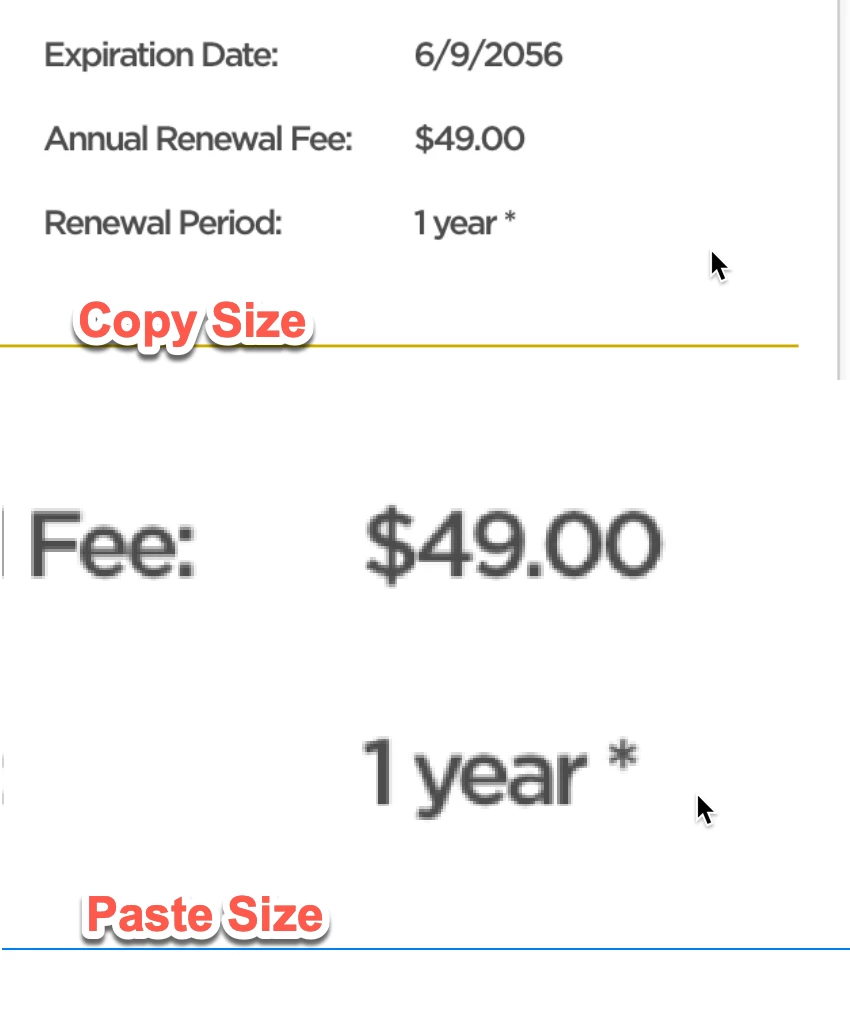
Take a screenshot of something while you're in XD, and when you paste it, it's HUGE. This really slows things down when you're trying to do ultra-rapid prototyping. How can I paste at the exact size of the element I just copied? 


I've seen other people with this issue on other forums but never a solution. Just thought I'd check if anyone had found a solution. 
 

    This topic has been closed for replies.

    2 replies

    Corina Murgila
    Adobe Employee
    Adobe Employee
    June 11, 2021

    Hi,


    Could please detail a little more your workflow or is it possible to attach a video so I could better understand the steps here?

    When you say "Take a screenshot of something while you're in XD" you take screenshot of something from XD? or outside of XD?


    Thanks

    Corina

    Known Participant
    June 14, 2021

    I take a screenshot of something within XD. I just use a short cut for taking a screenshot (I am on a Mac, but it's similar to Print Screen on a PC). Cmd + Ctrl + Shift + 4. So the element is now in my clipboard. When I paste, the size issue happens.


    This never was an issue when I used Sketch. I would use the exact same process, and I could paste an element directly on top of the larger image. This is important if you're doing rapid prototyping and don't need something to be functional, but are just quickly moving things around. It's terrible to have to worry that you now have an element which is the wrong size completely and you have to "fake it" and try to make it the right size. 

    elegant_leader5EE4
    Community Manager
    Community Manager
    June 10, 2021

    Hi there,


    Thanks for reaching out to Adobe.

    Sorry to hear that you're facing this issue.


    We have taken a note of this and have raised a ticket to engineering team. Hopefully you'll see the fix in fututre releases of XD.


    Thanks,

    Nawneet


    <Marking as correct only to highlight>

    Known Participant
    June 10, 2021

    Thank you!