
Participant
August 3, 2020
Answered

Help - Can't make a button (stroke. no fill) flexibly resize with padding options

  • August 3, 2020
  • 2 replies
  • 411 views

I am really struggling to allow for flexible resizing with a ghosted button I have designed, see screenshot. I was able to make the same button flexibile if I used a fill and not a stroke. I cant imagine that XD won't allow for a ghosted button to resize. Any advice? I tried grouping the text and rectangle shape, and also tried just going direct as a component. Neither works. 
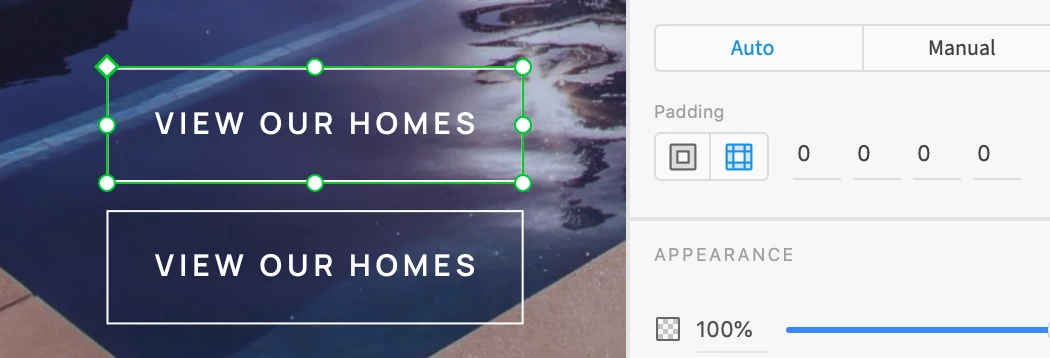
This topic has been closed for replies.
Correct answer Dan Rodney

The setup of this should be a rectangle behind a text object, but note the following:

  • Make sure the elements are NOT grouped inside the component! (I think this is where your problem lies.)
  • Make sure the text is point text (not area text) so it can resize automatically. You can find the point text button in the Text area of the Inspector on the right side of the XD window.
  • Use the alignment features to center the text inside the rectangle. 

2 replies

Dan Rodney
Community Expert
Dan RodneyCommunity ExpertCorrect answer
Community Expert
August 6, 2020

The setup of this should be a rectangle behind a text object, but note the following:

  • Make sure the elements are NOT grouped inside the component! (I think this is where your problem lies.)
  • Make sure the text is point text (not area text) so it can resize automatically. You can find the point text button in the Text area of the Inspector on the right side of the XD window.
  • Use the alignment features to center the text inside the rectangle. 
Adobe Certified Expert & Instructor at Noble Desktop | Web Developer, Designer, InDesign Scriptor
Harshika Verma
Community Manager
Community Manager
August 5, 2020

Hi Tash,


Thank you for reaching out. I tried to reproduce from what I got from your post and was able to resize the rectangle maybe I am not following the same workflow. Please see the attached the video below:


You need to make sure you are within the component while resizing the rectangle.


Let me know if I misunderstood you or share a video of your workflow for a better understanding.


I will try my best to help.


Thanks,

Harshika