



itouh2@i0plus.jp
Participating Frequently
June 17, 2020
Answered

Holes in the exported rectangular image

  • June 17, 2020
  • 7 replies
  • 591 views

Hi,

I found a problem with the image export.


1. Create a long vertical rectangle with size 1 for Border.
2. Round the corners.
3. Rectangle only export.
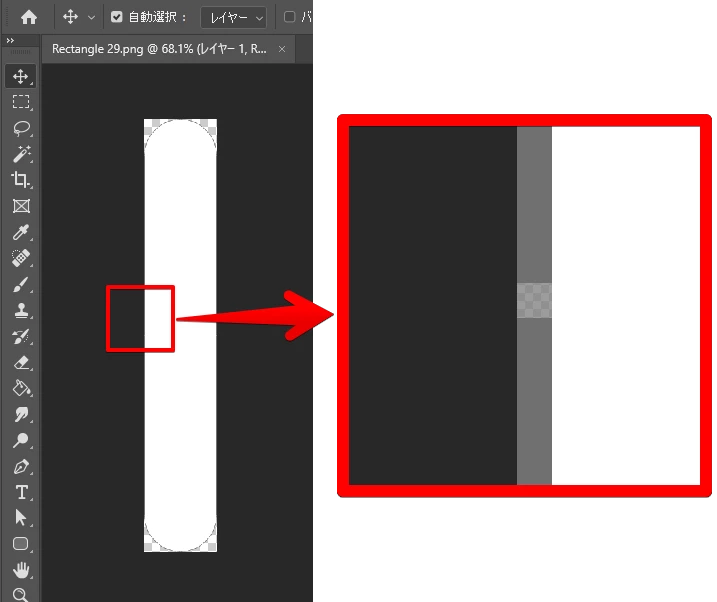
 

It's okay if border size is greater than 1. For example, 1.1px.

Is there a workaround?

Thank you for your help.

This topic has been closed for replies.
Correct answer Harshika Verma

Yes I can reproduce this too - the holes appear exactly on the midpoint, on both sides. How weird.


I have this funny feeling that your rounded corner rectangle has an odd number height: if so can you try decreasing the height by 1px to make it even number and export again to see if the holes appear?


This is a bug nonetheless, @Adobe guys


Thank you, Kenneth for tagging us. I have logged a bug for this issue. I will update you all as soon as I hear back from the team.


Thanks,

Harshika

7 replies

Participant
June 18, 2020

Reproduced on my Mac


OS: macOS Catalina
AdobeXD: version 30.0.12.14

Kenneth Kawamoto
Community Expert
Community Expert
June 17, 2020

I can't replicate this - does this happen every time? What's your OS?

itouh2@i0plus.jp
Participating Frequently
June 17, 2020


Yes, it happens every time.

OS: Windows10
AdobeXD: version 30.0.12.14

itouh2@i0plus.jp
Participating Frequently
June 17, 2020

I don't know the exact number, but it doesn't occur at a few hundred pixels in height size.
It looks like it needs to be more than 1000.