sutteng
Participant
Oct 29, 2021 9:35 AM UTC
Answered

How can I change xxhdpi resource to mdpi?

I confirmed that 'design at' disappeared after the Adobe xd 45.0 version update.
Then, how can I make the xxhdpi resolution resource into mdpi?
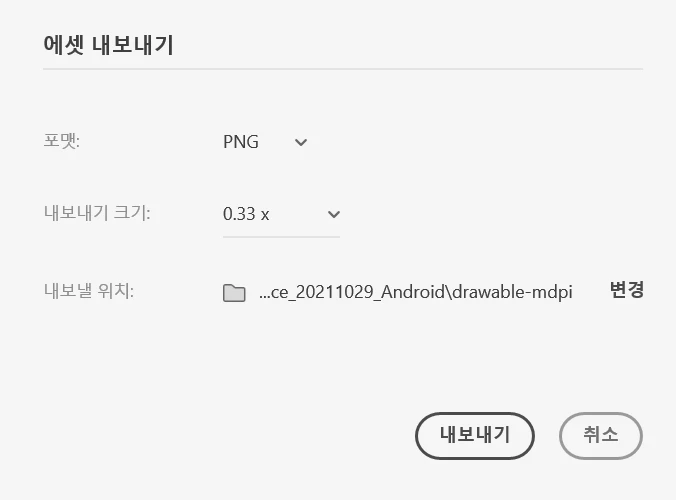
Is it best to write 0.33x (approximate value) directly in 'Export size'?


This topic is closed to new replies. Start a new post to keep the conversation going.
Corina Murgila
Corina MurgilaCorrect answer
Adobe Employee
Nov 1, 2021 2:43 PM UTC

Hi Corina.


How is one supposed to divide exactly by 3 when exporting? The field doesn't seem to accept fractions. A decimal doesn't work. 0.33 x isn't exactly 1/3rd. Given this user's case, a 2280 width artboard exported into 1/3 of the resolution should result in 760. 0.33x gives a width of 753.


Before we could pick "Designed at" 3x, and the export would divide exactly into 3 for 1/3rd of the resolution. Now it seems you can't really do that.


The previous implementation might have been confusing for some people, but I don't think just removing the "designed at" field was the right fix. Now it seems more limiting than it was before...


Ok, now I understand you usecase here.

My apologies, this was indeed a slip from our side.

I'm working with the team as we speak to find what’s the best solution here.

I'll let you know once I have more news.


Thank you, 

Corina

5 replies

Rishabh_Tiwari
Legend
Oct 29, 2021 10:55 AM UTC

Hi there,


Thanks for reaching out. Please try the suggestions shared here https://helpx.adobe.com/xd/help/export-design-assets.html and let us know if this helps or if you need any further assistance.


Regards

Rishabh

Translate
sutteng
suttengAuthor
Participant
Nov 1, 2021 4:29 AM UTC

Hi.

Thank you for your reply.


I read the help suggestion, but it didn't help me.

That site explains it based on 'mdpi' (ex)360×760),

But what I want to know is 'If the basic screen is made into xxhdpi (ex)1080×2280)

In this case, how can I make xxhdpi Resource into mdpi?

Is there only a way to directly enter an approximate value of 0.33x?


+) I've been choosing xxhdpi in the 'designed at' before the update.

Translate
Corina Murgila
Adobe Employee
Adobe Employee
Nov 1, 2021 9:06 AM UTC

Hi,


Yes, you can enter by hand any value between 0.1x and 10x. Just type in your input.

Pleae let me know if this helps!


Thank you

Corina

Translate