Participant
Aug 24, 2020 12:18 PM UTC
Answered

how can I open psd in xd?

Hello!


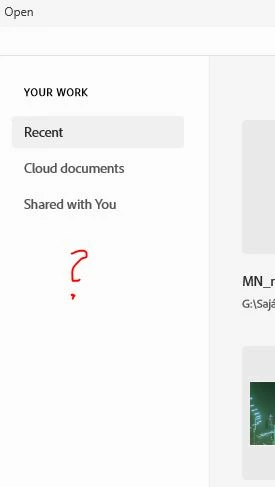
I have done much webdesign in adobe PS. And I need to open some of them in XD. But I cannot open, because there is no file browser modul in XD. See the screenshot. How can I open a psd file, that is on my local hard drive?


Thanks!
 

This topic is closed to new replies. Start a new post to keep the conversation going.
Spas K.
Spas K.Correct answer
Community Expert
Aug 24, 2020 12:36 PM UTC

Hi Petya, press Ctrl + Shift + O, while on that home screen, to open a file from your PC.


Otherwise, to access the menu and the "Open" command, you need to make a blank file first.

I know it's bad and confusing UX, but that's how it is for now 🙂

2 replies

Spas K.
Community Expert
Spas K.Community ExpertCorrect answer
Community Expert
Aug 24, 2020 12:36 PM UTC

Hi Petya, press Ctrl + Shift + O, while on that home screen, to open a file from your PC.


Otherwise, to access the menu and the "Open" command, you need to make a blank file first.

I know it's bad and confusing UX, but that's how it is for now 🙂

Translate
dPetyaAuthor
Participant
Aug 24, 2020 12:38 PM UTC

Okay.

Thanks for help!

Translate