



Question
How can I show all states of a component on one screen?
I have the simplest button component that is made of two elements:
- Icon
- Background
The button has 4 states:
- Default
- Default-Disabled
- Hover
- Hover-Disabled
- Down
Is there no way to see these in a hierarchy or side-by-side comparison? in the layers list, it should have:
> My button Component
- Emabled State Group
>>Default State
>>>> ICON
>>>> BG
>>Hover State
>>>> ICON
>>>> BG
>>Down State
>>>> ICON
>>>> BG - Disabled Group State
>>Default State
>>>> ICON
>>>> BG - >>Hover State
>>>> ICON
>>>> BG - >>Down State
>>>> ICON
>>>> BG
By creating a simple hierarchy like this, it's easily exported to any language. Most languages would be able to refer to any element using dot notation:
UP_btn.default.bg or UP_btn.hover.icon for example.
Is there anything like this for XD. Anything that creates a viable hierarchy on the screen to compare states? Something like this: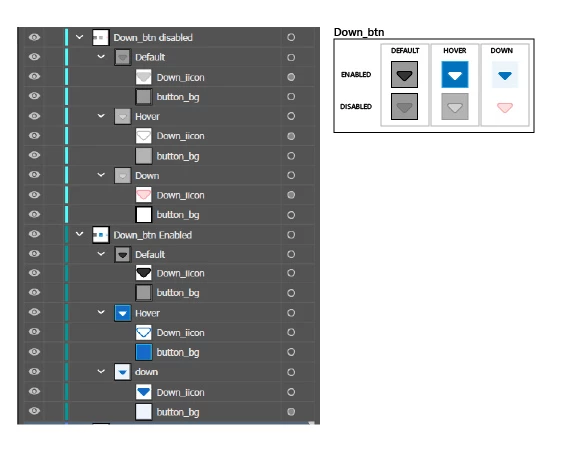
 AdChoices