
Participant
November 29, 2020
Answered

how do I remove the hover state from the other component that I copied from

  • November 29, 2020
  • 1 reply
  • 4729 views

I'm a complete begginer in adobe XD just want to put that out there.


So I have a button component with a hover state for a 1920 X 1080 web artboard. And i want to create the mobile version of my web i copied a bunch of things including the button and it turns out the button that i copy pasted from 1920 X 1080 shares the same hover state.


it's like this
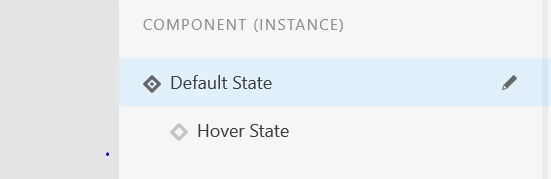
instead of this
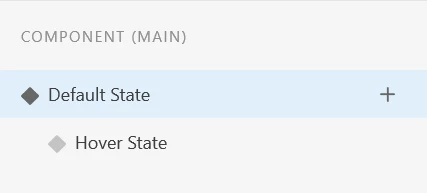
 

how do i get rid of the instance hover state? cause i want my second button to have it's own hover state.

Please help thank you in advance


    This topic has been closed for replies.
    Correct answer Rishabh_Tiwari

    Hi there,


    Sorry for the delay in response. To get rid of the hover state from an instance, you can ungroup the component. Let us know if this helps or if you need any further assistance.


    Regards

    Rishabh

    1 reply

    Rishabh_Tiwari
    Community Manager
    Rishabh_TiwariCommunity ManagerCorrect answer
    Community Manager
    December 3, 2020

    Hi there,


    Sorry for the delay in response. To get rid of the hover state from an instance, you can ungroup the component. Let us know if this helps or if you need any further assistance.


    Regards

    Rishabh

    Miri_ux@nice
    Participant
    June 20, 2021

    It's not working - its ungrouped and U cant not delete it