
Participant
May 17, 2022
Answered

How to change camera position on artboard in XD?

  • May 17, 2022
  • 1 reply
  • 311 views

Dear all,


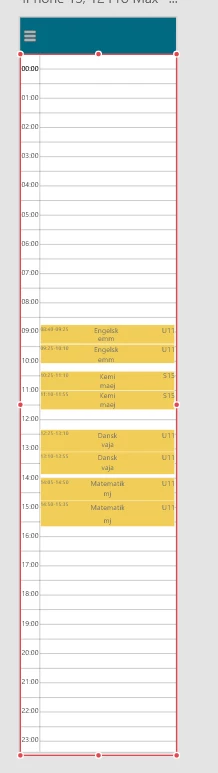
I am currently working on a calender app for my school project. The screenshot below shows the schedule artboard. The user is taken to this screen when he presses the "calender" button on a previous screen. However, I cannot figure out if I can change the default "camera" position. I would like to have the user land on the schedule artboard and have the camera or view start at 7:00.

I hope the question makes sense. I have a little trouble trying to explain exactly what I want to do.


This topic has been closed for replies.
Correct answer Myra Ferguson

You can change the vertical position of where the scrolling starts in Design Mode by doing the following:

  1. Make sure that your content is longer than the artboard size
  2. Set the content to Vertical Scroll
  3. Position the scrollable content on the artboard where you want it to appear (with 7:00 at the top)
  4. You'll see a dotted blue line at both the top and bottom of the scrolling content with a blue handle with two horizontal white lines. Drag the handles so that they are positioned on the artboard above and below the initially visible portion of the content.

1 reply

Myra Ferguson
Community Expert
Myra FergusonCommunity ExpertCorrect answer
Community Expert
May 18, 2022

You can change the vertical position of where the scrolling starts in Design Mode by doing the following:

  1. Make sure that your content is longer than the artboard size
  2. Set the content to Vertical Scroll
  3. Position the scrollable content on the artboard where you want it to appear (with 7:00 at the top)
  4. You'll see a dotted blue line at both the top and bottom of the scrolling content with a blue handle with two horizontal white lines. Drag the handles so that they are positioned on the artboard above and below the initially visible portion of the content.