
Participating Frequently
Feb 28, 2017 9:18 PM UTC
Answered

How to change "Start" page in XD?

Hi,
When I click the Share Online button top get a link, I noticed the Share Again button, in here (only in here... why?) I can choose icon for the project.
Also it shows (greyed out) the Starting Art board. But its NOT the one I want to start at... its the first Art-board I created. But I cant change it.


So how can I change the "Start" page?


Regards


<Title renamed by moderator>


Mark
This topic is closed to new replies. Start a new post to keep the conversation going.
IainNormanCorrect answer
Participant
Mar 1, 2017 11:13 AM UTC

You change it in prototype mode.

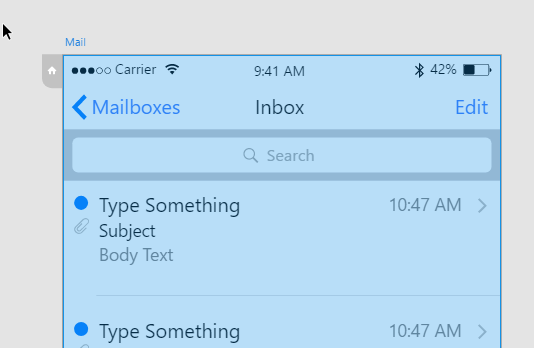
Select the artboard you want to be home, by clicking it's title, and you'll see a little grey home icon attached to the top left corner.

c823fa7c122344c48bb2cdf6888b1a0e.png

Click it and that artboard is now the start point for the prototype.

9 replies

Isone
Participant
Oct 28, 2021 8:35 PM UTC

This is no longer the correct solution.


This creates a new flow, however I need to be able to change the start/home board of an existing flow so that I can keep the same link, sharing, and comments. 

I expected you'd be able to click and drag the existing flow 'title' to another board however I cant find any info or solutions to do so.


From now all I can do is have a home  board for each prototype that isnt a 'design' screen and more like a title screen for the prototype.

Translate
Participant
Dec 9, 2021 11:46 PM UTC

I solved it.
Place the artboard just above the other artboards.

Translate
Isone
Participant
Dec 19, 2021 8:56 PM UTC

Sorry, this is not a solution to my problem - perhaps you missunderstand the issue; I want the prototype to start on a different 'home' board, however what you propose is changing the order that the artboards appear if I 'slideshow' through thhe prototype file - this still doesnt change the 'home' board.

Translate
Participating Frequently
Mar 19, 2021 6:03 PM UTC

intuitive. I would have thought it would be in the artboard menu.

Translate
IainNormanCorrect answer
Participant
Mar 1, 2017 11:13 AM UTC

You change it in prototype mode.

Select the artboard you want to be home, by clicking it's title, and you'll see a little grey home icon attached to the top left corner.

c823fa7c122344c48bb2cdf6888b1a0e.png

Click it and that artboard is now the start point for the prototype.

Translate
Participating Frequently
Mar 1, 2017 11:59 AM UTC

Thanks Iain... havent found a complete manual for XD yet... (Im not a video watching type) I dont think I woukld have ever figure that out!

Mark

Translate
elainecc
Participating Frequently
Mar 1, 2017 6:54 PM UTC

Hey, Mark-

You can check out the help documentation (no videos!) here: Adobe Experience Design (Beta) Help | Adobe Experience Design (Beta) Help

-Elaine

Translate