
Inspiring
January 10, 2022
Answered

How to create a dropdown selected item in XD?

  • January 10, 2022
  • 4 replies
  • 2562 views

Good day,


How would I go about showing the selected item (Item 1 in this example) in a Dropdown as the selected item?  Here is what I am trying to acheive (currently, "hard coded" and I want this to be dynamic)
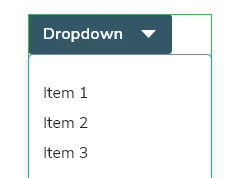


User selects Item 2:

Thank you.


<Title renamed by moderator>

This topic has been closed for replies.
Correct answer Doug21784293dvss

I found a solution.  Unfortunately, it is not dynamic, but for dropdowns with under 10 items it's a viable solution.

https://www.youtube.com/watch?v=WS3nV0F4eU4&t=266s


4 replies

try67
Community Expert
Community Expert
January 11, 2022

[Question moved to the Adobe XD forum and merged with the other thread]

Inspiring
January 11, 2022

Good day,


How would I go about showing the selected item (Item 2 in this example) in a Dropdown as the selected item? Here is what I am trying to acheive (currently, "hard coded" and I want this to be dynamic based on the value selected.)

User selects Item 2:

Thank you.

HARSHIKA_VERMA
Community Manager
Community Manager
January 11, 2022

Hi Doug21784293dvss,


Thank you for reaching out. We would request you to please check out this page: https://www.adobe.com/products/xd/learn/design/layout/create-dropdown-menu.html which might help you.


I am also keeping the discussion open for our experts for any other suggestion.


Hope it helps.


Thanks,

Harshika

Inspiring
January 11, 2022

Thank you Harshika.


I did go through this article previously and it does not cover my question.  :  (

try67
Community Expert
Community Expert
January 10, 2022

Are you referring to a PDF file? Because drop-down fields in PDF files work like that automatically. The selected item always appears as the text of the field.

Inspiring
January 11, 2022

No, I wasn't referring to a PDF in particular, my intent is to use this in a working prototype, but if the behavior is the same, sure.


I believe this is standard behavior for a dropdown.


Here is an example of an HTML dropdown in action:

https://www.w3schools.com/tags/tryit.asp?filename=tryhtml_select


Is this possible in XD?


Bernd Alheit
Community Expert
Community Expert
January 11, 2022

Why does you use the forum for Adobe Acrobat? Use the forum for XD.

Inspiring
January 10, 2022

Sorry, my question should have read (can't edit my post):


How would I go about showing the selected item (Item 2 in this example)