
Inspiring
September 23, 2020
Answered

How To create components without changing artboard layer order

  • September 23, 2020
  • 2 replies
  • 401 views

Hello! I'm designing an interactive color index.

I have 6 rectangles in four colors, and the idea is to activate/deactivate these shapes by clicking the button that matches their color, and creating multiple color combinations by having more than one button activated at the same time.
My only problem is that the shapes must mantain their original layer order:
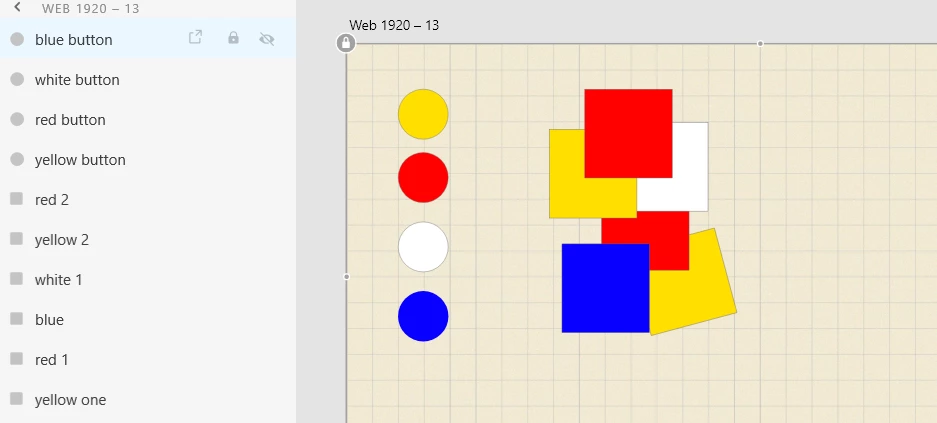
the shapes are stacked in a way that makes it impossible to create a component for each color, because it would group all the shapes with the same color together, and compromise the order above.

I've tried making the whole thing a single component and prototyping each color inside it, but it didn't work.

is there a way to make this sistem work?


thanks!


    This topic has been closed for replies.
    Correct answer Spas K.

    Hi Clara 🙂 


    If I understand correctly, you want to make it so that when you click the red circle for example, the 2 red squares disappear or appear.


    Right now one element's trigger can't affect another element or component's state or style on the same artboard.


    Since they are at a different "depth", the only way to do this right now would be to make a component encompassing all the elements on the page, or multiple artboards. In both cases, you will need to make one state or artboard for each possible scenario (of which there will be like 36 or something), and wire them all up, which would be rather complicated. 


    I would suggest just showing how it works with maybe 4 combinations, and the programmers will do the rest 🙂


    Hopefully that brings more clarity.


    Cheers!

    2 replies

    Spas K.
    Community Expert
    Spas K.Community ExpertCorrect answer
    Community Expert
    September 24, 2020

    Hi Clara 🙂 


    If I understand correctly, you want to make it so that when you click the red circle for example, the 2 red squares disappear or appear.


    Right now one element's trigger can't affect another element or component's state or style on the same artboard.


    Since they are at a different "depth", the only way to do this right now would be to make a component encompassing all the elements on the page, or multiple artboards. In both cases, you will need to make one state or artboard for each possible scenario (of which there will be like 36 or something), and wire them all up, which would be rather complicated. 


    I would suggest just showing how it works with maybe 4 combinations, and the programmers will do the rest 🙂


    Hopefully that brings more clarity.


    Cheers!

    Rishabh_Tiwari
    Legend
    September 24, 2020

    Hi Clara,


    Thanks for reaching out. I tried achieving similar animation and the approach that I took was to group the same color shapes individually and then making them a component. So if there are 4 colors(including no fill) then there will 4 components. Please try this approach and see if you are able to achieve it.


    Let us know if you need any further assistance.


    Regards

    Rishabh