


Known Participant
April 6, 2024
Answered

How to delete the ruler/guide I dragged onto the artboard?
  • April 6, 2024
  • 2 replies
  • 593 views

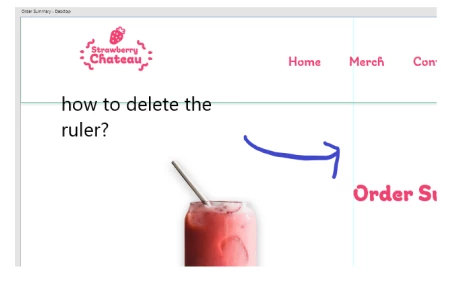
I tried right clicking, pressing delete, selecting it and pressing delete, but it's just stuck there. I just want to delete an individual ruler/guide that I clicked and dragged to the artboart. Please let me know how to delete the ruler/guide I created.


Thank you.

 

    This topic has been closed for replies.
    Correct answer Kenneth Kawamoto

    Can you try: View > Clear Guides

    2 replies

    Kenneth KawamotoCommunity ExpertCorrect answer
    Community Expert
    April 8, 2024

    Can you try: View > Clear Guides

    11PekoeAuthor
    Known Participant
    April 11, 2024

    What about clearing an individual ruler? Example...


    I just want to remove one of those rulers. How would I do that?


    Participating Frequently
    April 12, 2024

    The way you dragged onto the artboard, the same way you pick anyone and drag out from the artboard for an individual.

    Rishabh_Tiwari
    Community Manager
    Community Manager
    April 8, 2024

    Hi,


    Thank you for reaching out. Please try the suggestions shared in this discussion and let us know if this helps or if you need further assistance.


    Thanks

    Rishabh