
New Participant
August 6, 2020
Answered

How to disable adobe cookie banner on prototypes???

  • August 6, 2020
  • 3 replies
  • 3046 views

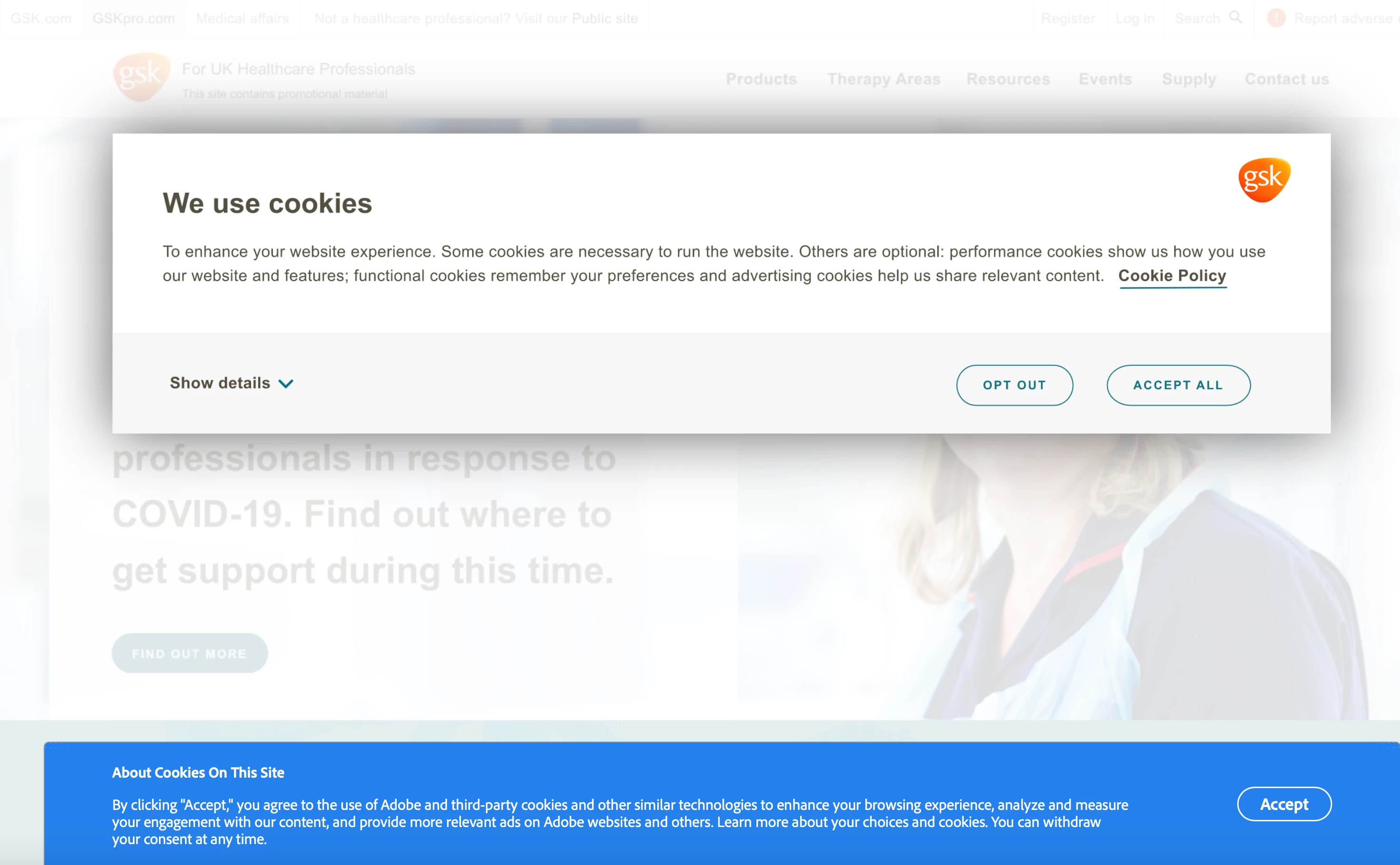
I'm trying to run a real world user testing session for large company's New cookie banner and other modals. When my testers go to my prototype the first thing they see is adobes cookie banner... on top of the gsk banner I'm trying to test.  This is ridiculous.

Why would adobe need to put a cookie banner on a prototype link. makes no sense at all.

https://xd.adobe.com/view/c1c8b542-74d6-4a39-8c3d-45e8caac382e-949b/?fullscreen&hints=off


    This topic has been closed for replies.
    Correct answer elainecc

    I would gladly submit my feedback if your website worked properly... but it doesn't, I tried and it failed, so I can't.

    Adobe shouldn't be tracking/giving cookies to users who come to test a prototype on an adobe XD share link... And therefore there shouldnt be any cookie banners there. But it's there... so that sucks.

    This is my feedback.  Maybe you can submit it to the devs since your website won't allow me to do so. I don't really care


    Sorry to hear you're upset about this. Unfortunately, this banner is legally required in order to conform to international rules around GDPR. While we would love to reduce friction for your end customers, we also as a company need to adhere to legal requirements.


    Thanks,

    Elaine Chao

    Sr. Product Manager, Adobe XD

    3 replies

    New Participant
    January 13, 2021

    I agree, this is rather annoying. Testing something that's non-standard size or sharing multiple embeded prototypes in a page with the cookie popups all over is rather annoying. There has to be a solution for this problem from the customer (mine) size. Preferrably - disable tracking that Adobe does on my prototypes. Alternatively - let me customise how this is shown to public whern testing something. 

    New Participant
    February 25, 2022

    As usual Adobe doesn't care, their products are deterioting by the day, I'm sick and tired of complaining about issues like this that don't get addressed. They don't care, they just want your fees.

    Sickening, as bad as the Foundry.

    emilier95458359
    New Participant
    October 12, 2020

    Hello. I have the same issue. The problem is that every time I load the page, the Cookies banner comes back again (even though I save the Cookies settings). We have done 3 tutorials on Adobe XD and the visitor can watch them all. If he has the banner three times, that won't be functional at all... 

    Do you have a solution please?

    dario1133Author
    New Participant
    October 12, 2020

    Best solution is to move to figma. Or sketch.
    Adobe is too big too care about it

    Rishabh_Tiwari
    Community Manager
    Community Manager
    August 6, 2020

    Hi Dario, 


    Sorry to hear about the trouble. I am afraid, we don't have an option to disable the cookie banner as of now, however, it does sound like a great feature request so I will share your feedback with the Engineering Team and you can do that too by creating this request:https://adobexd.uservoice.com/forums/353007-adobe-xd-feature-requests


    This is the best way of communicating with the Engineering and Product Management teams regarding issues and suggestions so they can be implemented in future releases. 


    Regards

    Rishabh

    dario1133Author
    New Participant
    August 6, 2020

    Thanks Rishabh,

    I've tried posting the feature request a few times but the site fails and honestly I'm getting bored.  I guess I'll just recommend my organisation uses sketch+invision. instead of adobe.

    HARSHIKA_VERMA
    Community Manager
    Community Manager
    August 6, 2020

    Hi Dario,


    I am sorry for the frustration. It looks like you are experiencing the similar issue mentioned here: https://adobexd.uservoice.com/forums/353007-adobe-xd-feature-requests/suggestions/40644277-reposition-the-cookie-banner-on-shared-links


    Please submit your feedback and upvote the request to add your voice.


    In addition to that accepting cookies should make the warning go away.


    Hope it helps.


    Thanks,

    Harshika