


Participant
Sep 14, 2020 1:25 AM UTC
Answered

How to enable the "Edit in Photoshop" option in XD?

Is there a setting for this to enable? I just install the new update from Adobe XD and after I notice that "Edit in Photoshop" becomes disabled. 
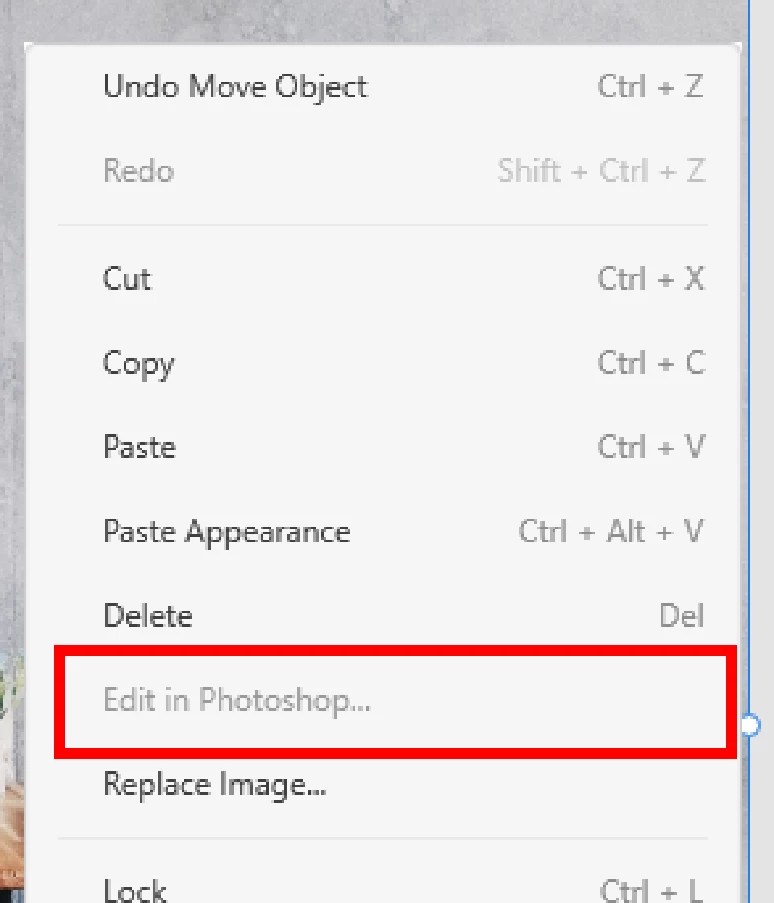

I hope someone could help. Thanks! 


<The Title was renamed by moderator>

This topic is closed to new replies. Start a new post to keep the conversation going.
Harshika Verma
Harshika VermaCorrect answer
Community Manager
Sep 14, 2020 2:33 PM UTC

Hi there,


Thank you for reaching out and using Adobe XD. In order to use the "Edit in Photoshop" option you need to make sure you have the image selected in the artboard and you have Photoshop installed on your machine. 

Please see this tutorial: https://www.youtube.com/watch?v=_-Wi6iud7iY


Let us know if that helps.


Thanks,

Harshika

1 reply

Harshika Verma
Community Manager
Harshika VermaCommunity ManagerCorrect answer
Community Manager
Sep 14, 2020 2:33 PM UTC

Hi there,


Thank you for reaching out and using Adobe XD. In order to use the "Edit in Photoshop" option you need to make sure you have the image selected in the artboard and you have Photoshop installed on your machine. 

Please see this tutorial: https://www.youtube.com/watch?v=_-Wi6iud7iY


Let us know if that helps.


Thanks,

Harshika

Translate