Participating Frequently
November 19, 2020
Answered

How to fix error compoent has required components that conflicts with components in file?

  • November 19, 2020
  • 10 replies
  • 7403 views

Hi all,


When updating my design library/design system in XD, I often get this error in XD the first time I press the "Update" button:



When I press "update" the second time, the library updates successfully and this error doesn't appear anymore. Every update I have to do, I face this issue again.


May I ask what this error means and how to fix it?


<Title renamed by moderator>

Correct answer chamael3on!!

I found a solution to my similar problem:

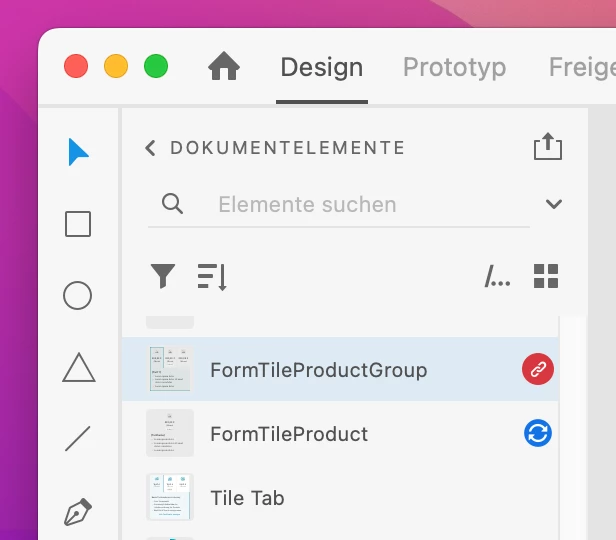
  1. Delete component with red "missing-component" indicator:


  2. Then click "update all"
  3. Now you just have to replace deleted component with working one.


I just had to delete one specific component, I edited recently. 

Hope this helps.

10 replies

StefanB.83
Known Participant
July 7, 2023

Hey Adobe, could you please come with an easy way to fix this problem - I have to deal with it every month or so. Going throught hundreds or thousands of components is not easy - especially when I have NO option to Delete those Red Components or even the Blue ones.  

At least let me know on which XD Documents are those components located so I can Update them. 
Quite ridiculous to find that the component that require other components that conflict with components in my documents are part of the Design System - Which is UP TO DATE!!!! 

PLEASE, PLEASE, PLEASE - Fix this as soon as possible!  :(( 

chamael3on!!
chamael3on!!Correct answer
Inspiring
September 26, 2022

I found a solution to my similar problem:

  1. Delete component with red "missing-component" indicator:


  2. Then click "update all"
  3. Now you just have to replace deleted component with working one.


I just had to delete one specific component, I edited recently. 

Hope this helps.

Participant
October 6, 2022

Wonderful!! It worked for me as well, great thanks for sharing!

Participating Frequently
July 13, 2022

Problem: I am having trouble implementing a model (or some other code that is similar to something already in Java SE Platform, Standard Edition).

Look at the Java SE source code. It is distributed with the JDK, and it is a great resource for finding code examples of implementing models, firing events, and the like.


Problem: Whenever the text in my text field updates, the text field's size changes.

You should specify the preferred width of the text field by specifying the number of columns it should have room to display. To do this, you can use either an int argument to the JTextField constructor or the setColumns method.


Hope This Helps,

Peter

StefanB.83
Known Participant
July 12, 2022

Same issue on my end... 2 years later. Why this hasn't been automated yet?

If I press Update all - then all should be updated, including nested components. I have hundreds, is crazy to go one by one and check for updates. Please come with a fix soon on this. 

We, the users, don't really care about this detail (if some do - prompt to chose all or nested only, or whatever othe option). All we want is to get components updated with changes on masters.

HARSHIKA_VERMA
Community Manager
Community Manager
July 12, 2022

Hi @StefanB.83,


We are sorry for the inconvenience. Could you please confirm if you've checked Randy's comment on this post? If so, I suggest you submit the feedback on the XD UserVoice page and share the URL with us for tracking purposes.


Hope it helps. 


Thanks,

Harshika

Participating Frequently
September 15, 2022

Hello, same issue here. And for some reason the explanation is never clear, how can I open those libraries? where? These libraries are not mine but shared

Participant
June 29, 2022

I am also facing the same issue. I updated the libraries but the issue persists. Please help! 

Participant
June 20, 2022

I still face the same issue too, followed all the steps (Update All, Opened each library file) but no luck. This happened to me twice this week and it means a lot of additional hours and work to do what the library should be doing automatically. I understand if there is no fix yet, but how do I at least avoid it from happening again???

Participant
August 17, 2021

I am suffering from this problem too. The error message suggests to to update the libraries with the conflicting components to the same version, but how can you do it?

I have created one component library file that contains tens of components (masters), shared the library, and used the components in several project files. I update the library with the new components frequently and sometimes also fix the existing components — so it is not a "frozen" document. Depending on a component, the project files can contain from tens to hundrends of instances of a component.


@Rishabh_Tiwari

  • The problem occurs with multiple files — not just with a specific one.
  • I cannot say if the problem appears after each update of XD — It can be so too. I updated to the version 42.1.22.4 last week but noticed the problem with a couple of XD files today.
  • The problem occurs mostly with project files I have not opened for a while (e.g. a month) but the library has been updated meanwhile.
  • When the problem occurs, any attempt to update the component (by clicking the blue icon) in Document assets leads XD application to crash — or at least the colorful spinwheel appears to the screen (for minutes or even hours) and XD turns to be unresponsive.
Randy Edmunds 2
Adobe Employee
Adobe Employee
August 17, 2021

For this error message:

"Component [name] has required components that conflict with components in your document. Please update the libraries with these components to the same version: [library,...]"


This generally happens when trying to Import or Update a Component has a nested Component, and the nested Component has a pending Update. Start by trying Update All to update required Components that are Local to your Document.


If error persists, open each external Library (listed at end). Opening each external Library ensures that they are converted to same version of XD you are running. Also Update All to apply any pending Updates to these docs.


Hope this helps,

Randy


Participating Frequently
December 29, 2021

Problem persists for me. I've spent hours troubleshooting this. Also consider leaving the warning alert up until we dismiss it, so I don't have to take a quick screenshot just to read the whole thing


Participant
June 17, 2021

I have this issue too. It prevents me from using my components elsewhere other than the file they are defined in.

Participant
May 10, 2021

This is happening for me too; I can't figure out how to fix it. I've deconstructed the elements and they all appear fine and connected and such.

Participant
May 13, 2021

do we have solution for this.. I have same problem. 

Rishabh_Tiwari
Community Manager
Community Manager
December 1, 2020

Hi there,


We're so sorry for the delay in response. Could you please confirm if you are still getting this error on the latest version of XD which is XD 35.1? If yes, please share a few more details like:


  1. Is this happening with a specific file or multiple files?
  2. Do you get this error every time after updating XD?


Regards

Rishabh

Participating Frequently
February 16, 2021

So im on verison 37.0.32.10 and this is still an issue?


It happens when using a design system UI components file with lots of pages...  i have a timeline built on one page, i want to add to might propotype file - i try adding i get this issue reponse and of course my timeline states arent up-to-date.


lots file telling me but i cant make them all out...