
Inspiring
November 13, 2016
Answered

How to get type aligned between desktop/mobile previews

  • November 13, 2016
  • 2 replies
  • 324 views

Hi There,

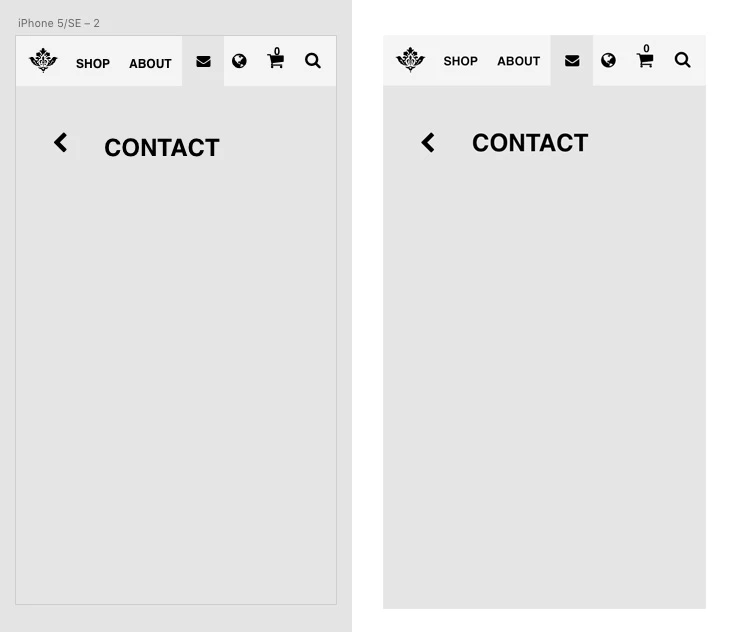
I've noticed that the vertical position of type doesn't match between desktop and mobile previews - mobile is higher.

See attached, mobile is on the right - is there a way to get preview?

Cheers

Ben
    This topic has been closed for replies.
    Correct answer CoreyRLucier

    So continuing to research but there has been a recent fix related to baseline position with mobile preview but it was specific to one font face I believe... Helvetica.  So you should see the fix in the next public release.

    If the font you are seeing issues with is something else entirely we will test locally once you provide further details.

    2 replies

    CoreyRLucierCorrect answer
    Inspiring
    November 14, 2016

    So continuing to research but there has been a recent fix related to baseline position with mobile preview but it was specific to one font face I believe... Helvetica.  So you should see the fix in the next public release.

    If the font you are seeing issues with is something else entirely we will test locally once you provide further details.

    Inspiring
    November 14, 2016

    Thanks for reporting, I will look for an existing issue and file if I can't find one, but just to clarify...

    Is the text misaligned on the design surface as well or is it consistent with desktop 'preview' window? 

    Can you share info on the font and font attributes you are using?

    Regards,

    Corey L.