

Inspiring
October 5, 2021
Answered

How to hide the Share button

  • October 5, 2021
  • 4 replies
  • 2744 views

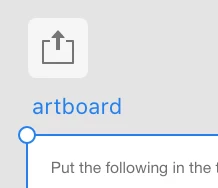
How do I hide the Share button that is above the artboard? 
 

This topic has been closed for replies.
Correct answer Ansubedi03

Hello,

Thank you for reporting your issue. Unfortunately, you can't hide the share icon , instead you can uncheck the auto-create link when sharing which is present under Preferences.

In Mac -> Xd icon -> Preferences -> Auto-create link when sharing (uncheck it) 

In Win -> Edit -> Preferences -> Auto-create link when sharing (uncheck it) 

Regards,

Anita Subedi

4 replies

Participant
April 23, 2024

For an app used to design user interfaces, the share button and its immutable nature is not great interface design. 

Rishabh_Tiwari
Community Manager
Community Manager
April 23, 2024

Hi,


Thank you for reaching out and sharing the feedback. Let me assure you I'll share your feedback with the team.


Thanks

Rishabh

perihan
Participant
January 10, 2024

You can't actually hide that icon but, as Ansubedi03 said, you can disable auto link creation. On macOS, though, you need to: 

-> click on the XD icon -> Settings -> Auto-create link when sharing (uncheck it)


Participant
March 6, 2024

Me on the other hand, can see it on some files but not on others and i don't know why. I do need it.

Participant
December 24, 2021

I'd really love to remove that button as well. I keep accidentally hitting it and creating share links that I don't want to share. On top of that it's really annoying process to delete links. This is a horrible design element.

Participant
April 24, 2024

Completely agree! I want that Share button GONE!

Ansubedi03Community ManagerCorrect answer
Community Manager
October 5, 2021

Hello,

Thank you for reporting your issue. Unfortunately, you can't hide the share icon , instead you can uncheck the auto-create link when sharing which is present under Preferences.

In Mac -> Xd icon -> Preferences -> Auto-create link when sharing (uncheck it) 

In Win -> Edit -> Preferences -> Auto-create link when sharing (uncheck it) 

Regards,

Anita Subedi
