



claudiam-noesis
Participating Frequently
August 28, 2020
Question

How to Import XD assets to CC library from within the XD Document

  • August 28, 2020
  • 1 reply
  • 514 views

Hi, I'm trying to add assets (colors) from an existing XD document into a CC library, however, there doesn't seem to be any way to do this. When I drag the assets into the CC library panel, nothing happens.
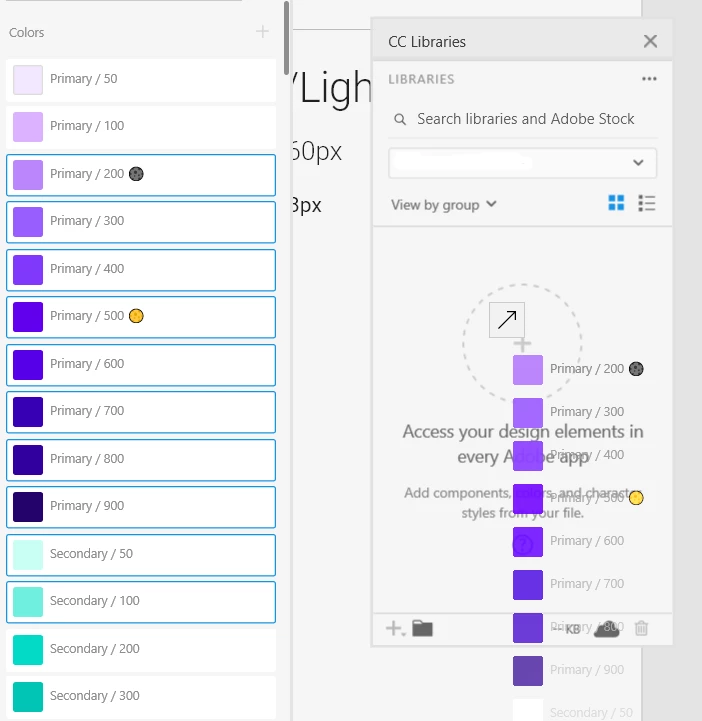
 

How can I import them?


{Renamed By MOD}

This topic has been closed for replies.

1 reply

Rishabh_Tiwari
Legend
August 28, 2020

Hi Claudia,


Thanks for reaching out. In order to add the color in CC Library from within the XD document, please select the object with that color and then on the CC library panel, please click on the + icon(Add Content) and the color should be added to the CC Library. If this doesn't help, please share the version of XD and the operating system, we'll try our best to help you with it.


Regards

Rishabh

claudiam-noesis
Participating Frequently
August 28, 2020

Thanks for the reply.
The method you've indicated allows me to add the color swatch of an object, however, if I select several objects, I can only add it as a graphic:

With only one object selected:


Since I already have all the colors set up and named in the XD assets panel, I was hoping there'd be a way to import them all to the CC library.


Rishabh_Tiwari
Legend
September 8, 2020

Claudia, for more information on working with CC Library you can refer to this article: https://helpx.adobe.com/creative-cloud/help/libraries.html


Feel free to reach out if you have any other questions or issues.