wertysade
Participant
May 15, 2020 5:32 PM UTC
Answered

How to make Folder tab shape

Hello, could you please help me with a tip how i can draw folder tab shape in XD, if it even posibble, i now how to make it in Illustrator, but XD has much less tools for that. 

 

This topic is closed to new replies. Start a new post to keep the conversation going.
Rishabh_Tiwari
Rishabh_TiwariCorrect answer
Legend
May 15, 2020 8:48 PM UTC

Hi there,


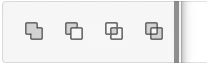
Thanks for reaching out. You can create folders using tools shown in the below screenshot. You can also import it from Illustrator.  I also found a video tutorial to which you can refer, please jump to 21:16 minutes: https://www.youtube.com/watch?time_continue=53&v=UvkKSBsu5ng&feature=emb_logo 


Regards

Rishabh


3 replies

Peter Villevoye
Community Expert
Community Expert
May 16, 2020 9:52 PM UTC

Another option is to simply create in in Illustrator, copy the artwork and paste it into an Adobe XD artboard ! And double-click the shapes if you want to edit them in XD. You'll see the familiar anchor points popping up. There's only a big difference in how you draw and edit paths in XD. For instance, you change an anchor point from corner to curve by double-clicking it again. So the result looks the same, but the methods are quite different !

Translate
Rishabh_Tiwari
Rishabh_TiwariCorrect answer
Legend
May 15, 2020 8:48 PM UTC

Hi there,


Thanks for reaching out. You can create folders using tools shown in the below screenshot. You can also import it from Illustrator.  I also found a video tutorial to which you can refer, please jump to 21:16 minutes: https://www.youtube.com/watch?time_continue=53&v=UvkKSBsu5ng&feature=emb_logo 


Regards

Rishabh


Translate
wertysade
wertysadeAuthor
Participant
May 16, 2020 7:29 AM UTC

Thank you!

Translate