


Participant
Jun 19, 2020 8:16 AM UTC
Answered

How to mask in Adobe XD on Windows

Hey there, greetings from my side. I've started using adobe xd since yesterday on Windows 10. However, masking is not working with any shapes or vectors in my Adobe Xd. There is no option to mask an object on right-click and nothing occurs with the command "ctrl+shift+M". Can someone enlighten me on how to mask an object or how to fix this problem? 
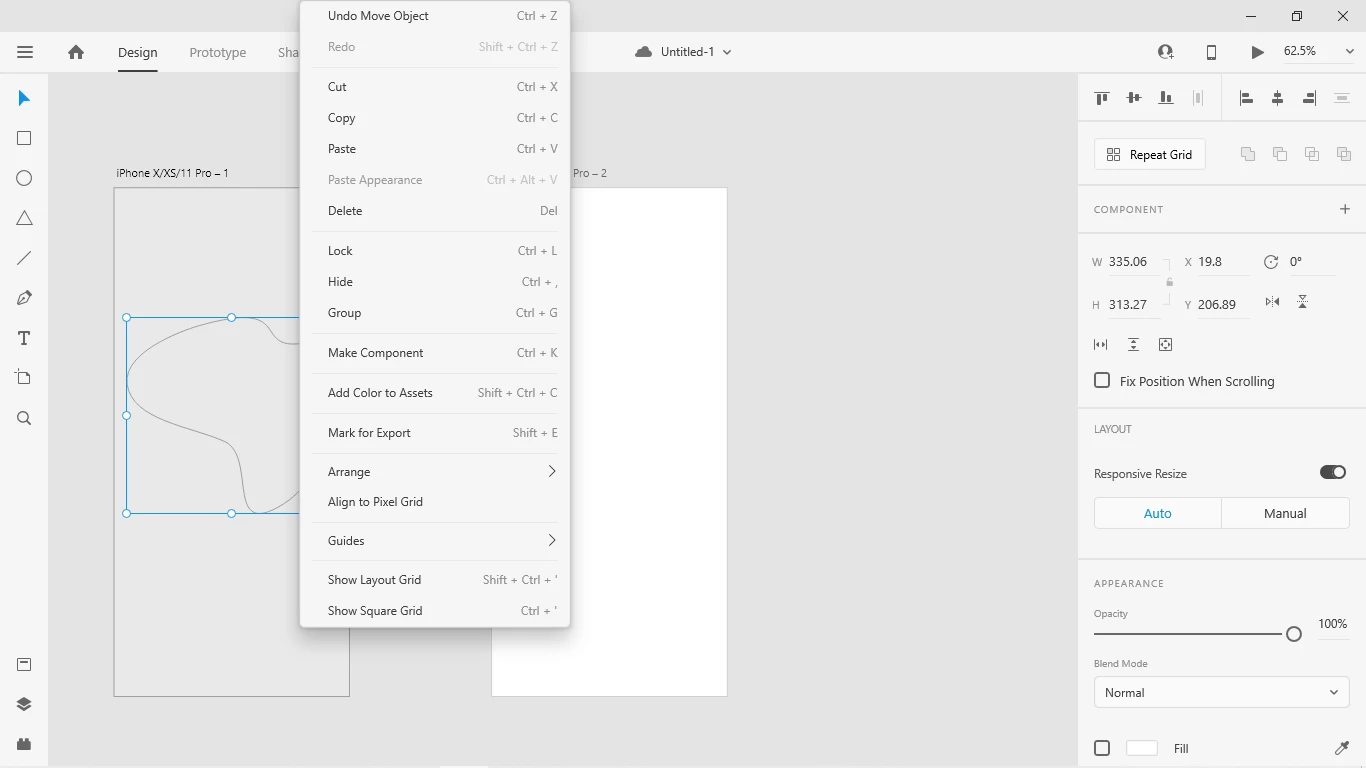
{Renamed By MOD}

This topic is closed to new replies. Start a new post to keep the conversation going.
Rishabh_Tiwari
Rishabh_TiwariCorrect answer
Legend
Jun 19, 2020 11:21 AM UTC

Hi Nitish,


Thanks for reaching out. Please refer to this article: https://helpx.adobe.com/in/xd/how-to/mask-in-xd.html

Let us know if this helps or if you need any further assistance.


Regards

Rishabh

1 reply

Rishabh_Tiwari
Rishabh_TiwariCorrect answer
Legend
Jun 19, 2020 11:21 AM UTC

Hi Nitish,


Thanks for reaching out. Please refer to this article: https://helpx.adobe.com/in/xd/how-to/mask-in-xd.html

Let us know if this helps or if you need any further assistance.


Regards

Rishabh

Translate