Participant
April 17, 2020
Answered

How to wire components for interactive prototype

  • April 17, 2020
  • 1 reply
  • 388 views

I have added 3 checkboxes to an artboard (consisting of components that change from the default off state to the active state on by tapping on them) and want to switch to the next artboard when all three checkboxes are set to on. Is this feasible in XD, and how do the components have to be wired if so?


{Renamed By MOD}

This topic has been closed for replies.
Correct answer Rishabh_Tiwari

Hi there,


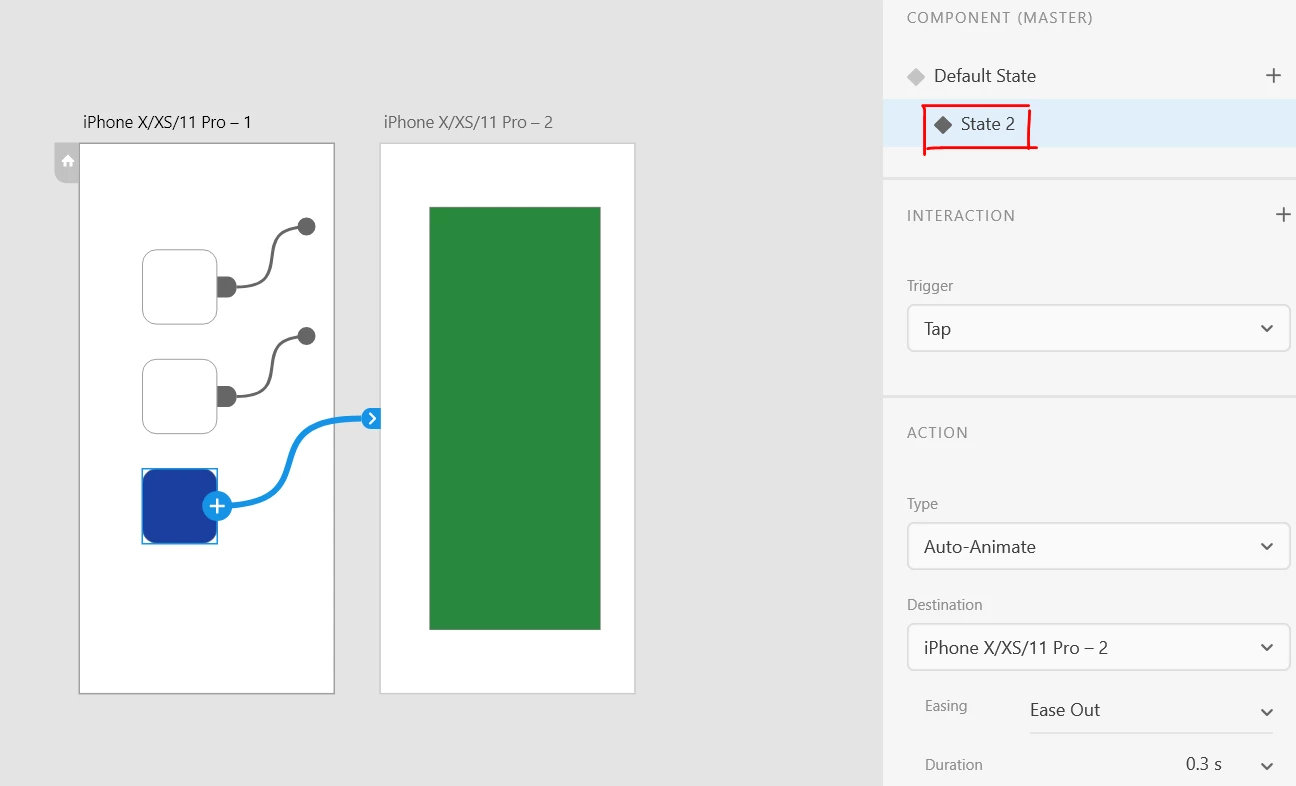
Thanks for reaching out. Yes, this can be done in Adobe XD. In order to achieve that, once you have wired up the checkboxes, you will need to wire up the 2nd artboard with the Active state of the third checkbox. I have attached a screenshot of the prototype window and a sample file link:


Note: There will be an extra Tap as a trigger to navigate from an active state of the third box to the next artboard.


Sample file: https://xd.adobe.com/view/9d53e33e-145e-4243-4f0a-b5ead6fbe4b4-eb62/


Let us know if this helps or if you need any further assistance.


Regards

Rishabh

1 reply

Rishabh_Tiwari
Rishabh_TiwariCorrect answer
Legend
April 17, 2020

Hi there,


Thanks for reaching out. Yes, this can be done in Adobe XD. In order to achieve that, once you have wired up the checkboxes, you will need to wire up the 2nd artboard with the Active state of the third checkbox. I have attached a screenshot of the prototype window and a sample file link:


Note: There will be an extra Tap as a trigger to navigate from an active state of the third box to the next artboard.


Sample file: https://xd.adobe.com/view/9d53e33e-145e-4243-4f0a-b5ead6fbe4b4-eb62/


Let us know if this helps or if you need any further assistance.


Regards

Rishabh