Participant
March 22, 2019
Answered

I can not apply korean in grid group text.

  • March 22, 2019
  • 2 replies
  • 459 views

I can not apply Korean in grid group text.

When I drag my text file to my grid text and drop out.

All text is broken like this
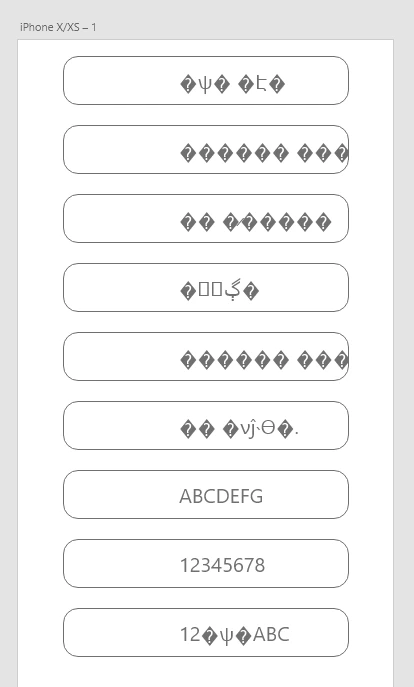
It happens only when it's Korean and excludes the alphabet and number.

Does anyone know why this is happening?

This topic has been closed for replies.
Correct answer elainecc

My guess is that you’re on Windows and that you’ve not encoded the source file correctly. In Notepad, Save As the document and at the bottom of the Save Window, choose “UTF-8” as the encoding, NOT “Unicode” or “ANSI.” Then drag that into your repeat grid.

Let me know how that works!

2 replies

elainecc
elaineccCorrect answer
Participating Frequently
March 22, 2019

My guess is that you’re on Windows and that you’ve not encoded the source file correctly. In Notepad, Save As the document and at the bottom of the Save Window, choose “UTF-8” as the encoding, NOT “Unicode” or “ANSI.” Then drag that into your repeat grid.

Let me know how that works!

Participant
March 24, 2019

It works!! Thank you Elaine.

Kenneth Kawamoto
Community Expert
Community Expert
March 22, 2019

Can you type in in the text field in Korean?

Participant
March 22, 2019

I can type in that text field in Korean (my OS is Korean)

and Korean was also inputted in that text field.