g.alexanders37024324
Participant
January 15, 2017
Answered

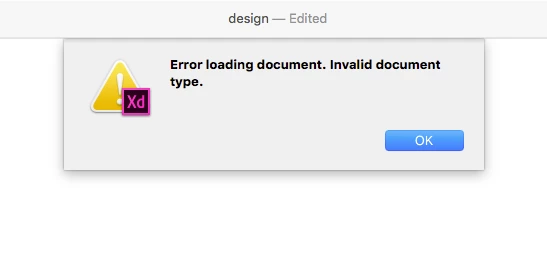
I can not open my XD file.

  • January 15, 2017
  • 5 replies
  • 18604 views

I got this error.

And then, I checked error log on Console App.

Here is that.

1/15/17 14:51:30.796Adobe XD[27482]writing to output file got error: Result too large
1/15/17 14:51:30.796Adobe XD[27482]error processing data: Invalid argument
1/15/17 14:51:42.806ReportCrash[61770]Write failed to file /Users/*******/Library/Logs/DiagnosticReports/Adobe XD_2017-01-15-145142_XanderAmith.crash - uid: 502 gid: 20, euid: 502 egid: 20 - error 28: No space left on device
1/15/17 14:51:42.806ReportCrash[61770]Failed to save crash report for Adobe XD[27482] (version 0.6.8.6 (0.6.8.6)) to file:///Users/*******/Library/Logs/DiagnosticReports/Adobe%20XD_2017-01-15-145142_XanderAmith.crash.
1/15/17 14:51:42.821ReportCrash[61770]Process:               Adobe XD [27482]
1/15/17 14:51:42.821ReportCrash[61770]Path:                  /Applications/Adobe Experience Design CC (Beta)/Adobe Experience Design CC (Beta).app/Contents/MacOS/Adobe XD
1/15/17 14:51:42.821ReportCrash[61770]Responsible:           Adobe XD [27482]
1/15/17 14:51:42.833ReportCrash[61770]       0x10871b000 -        0x10a4c2fff +com.adobe.xd (0.6.8.6 - 0.6.8.6) <C28228FA-5223-34D5-B860-D6E7C44ECC3D> /Applications/Adobe Experience Design CC (Beta)/Adobe Experience Design CC (Beta).app/Contents/MacOS/Adobe XD

And I can not open Backup files by TimeMachine.

Why can't I open backup files too?

I have to fix this.

Due date is almost there.

Please help me.

    This topic has been closed for replies.
    Correct answer Preran

    Yeah, I don't think anything is wrong with the file. I hope Adobe isn't prioritizing dev for Windows...

    Yes, new iMacs. New XD version. When I open XD, the File > New and File > Open menu options are greyed out. And when I drag and drop the file onto the program icon/shortcut, same thing happens as double-clicking - it animates briefly but does not actually open. However, I've found a bypass - I can open XD, open a new template, then drag and drop my file onto the open template, it will finally open. I'm sure this isn't the preferred method and would be great to see this major bug addressed asap.


    That definitely does not sound ideal to me. Can you try uninstalling using the Creative Cloud cleaner Use the Creative Cloud Cleaner Tool to solve installation problems and then reinstalling the software?

    If you continue to have issues, please send me your Adobe ID, location, and phone number over a private message. To send a private message, click my picture and use the Message button. We will get in touch with you for investigation.

    Thanks,

    Preran

    5 replies

    aynroberts
    Participant
    February 7, 2018

    Can't open my XD file. Please reach out with a contact to reach out to to help in restoring access to the file.

    -Ayn

    Preran
    Legend
    February 9, 2018

    Would it be possible to upload your file to a shared location such as Dropbox or Creative Cloud and share the URL with me over a private message? To send a private message, click my picture and use the Message button.

    Participant
    April 18, 2018

    I'm having the same issue with my file - it opens fine on another laptop (apple, macOS Sierra, 2016) with the latest XD version (7.0.12.09) but on this computer, (a 2017 iMac with the same version of XD) the file won't appear. I say appear because I click on my XD file itself and the animation showing it opens plays, and XD itself opens, but the file remains invisible. If I quit XD and reopen only the program, the file menu options for Open and New are inactive (see this link - Dropbox - Screen Shot 2018-04-18 at 1.02.27 PM.png).​. This has happened multiple times, does any have any idea how I can access these files?!

    my xd file

    Dropbox - Artistry Start.xd

    cristinadias7
    Participant
    December 28, 2017

    Same problem here. Can't open the file, 147 kb, no images linked.

    Preran
    Legend
    January 10, 2018

    Hi Cristina,

    If you are still facing this issue, I suggest getting in touch with Adobe Customer care contact-bumper for assistance.

    Thanks,

    Preran

    starleysparks
    Participant
    April 24, 2017

    Hi folks, did you resolve this?

    I'm having exactly the same problem, if I can't fix it I'm going to have to scrap the project.

    Preran
    Legend
    April 25, 2017

    Would it be possible to share the link with us over a private message. To send a private message to Elaine or me, click our profile picture and share the link to your file with us.

    Thanks,

    Preran

    Participant
    January 19, 2017

    I used around 10 images of 4MB I think (format PNG and Tiff). I can't open the file anymore.
    Thanks anyway.

    elainecc
    Participating Frequently
    January 31, 2017

    XavMat-

    Can you please send us a copy of the XD file? You can upload it to a file sharing service and PM me with a link.

    -Elaine

    Participant
    January 31, 2017

    I have had this same problem. I can't find any way of accessing the file. Can I send it to you?

    Participant
    January 16, 2017

    Hello!
    It happened to me 2 times today. Is it due to the size of the images linked?

    Please HELP too!

    Preran
    Legend
    January 17, 2017

    Can you try deleting images one by one to locate the source of the issue? How big are your image files? It is likely that either the size or the format of your files is leading to this issuue.

    Participant
    July 11, 2020

    Hi, I'm haveing the issue that i am not able to open the files as it takes too long time and hangs my system with it.Can you plz resolve the issue