
Participant
June 24, 2020
Answered

I can't find Export Design Specs Button

  • June 24, 2020
  • 2 replies
  • 320 views

Hi there.

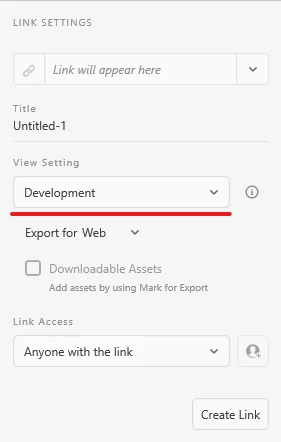
I looking for 'Export Design Specs' Button in Share.

Now, Just Find 'Create Link' Button.

The Problem is the error of not being able to connect keeps pop-up. But When I checked, Internet connection is normal. 


How can i do this? 
    This topic has been closed for replies.
    Correct answer Spas K.

    There's no "Export Design Specs" Button.

    You select the type of link from "View Setting", and set it to "Development".

    Then click the "Create Link" button to generate the link.


    About the connection, try the steps Rishabh provided.

    2 replies

    Spas K.
    Community Expert
    Spas K.Community ExpertCorrect answer
    Community Expert
    June 24, 2020

    There's no "Export Design Specs" Button.

    You select the type of link from "View Setting", and set it to "Development".

    Then click the "Create Link" button to generate the link.


    About the connection, try the steps Rishabh provided.

    Rishabh_Tiwari
    Legend
    June 24, 2020

    Hi there,


    Sorry to hear about the trouble. Please try the steps shared below:


    1. Signout of XD and Adobe CC Desktop app.
    2. Close CoreSync and all Adobe related Process from Task Manager/Activity Monitor.
    3. Sign back on Adobe CC Desktop app and launch XD from there and check if it works.


    If it still doesn't work, please share a few more details like:


    1. The version of XD and OS.
    2. A screenshot of the Share Screen with the error.
    3. Are you connected to a private network or a managed network like a work or school network?


    Regards

    Rishabh