
Participant
June 3, 2020
Answered

I can't install adobe Xd in my toshiba satelite c650

  • June 3, 2020
  • 1 reply
  • 1038 views

Please I need help I can't install adobe Xd in Toshiba satellite c650, their is an error message about GPU driver and upgrade, I have try to upgrade and updates my graphics driver but not working.

    This topic has been closed for replies.
    Correct answer Rishabh_Tiwari

    Okay thank you for your consign about the error I'm getting while trying to install Adobe xd. Bello is my system specification and graphics details
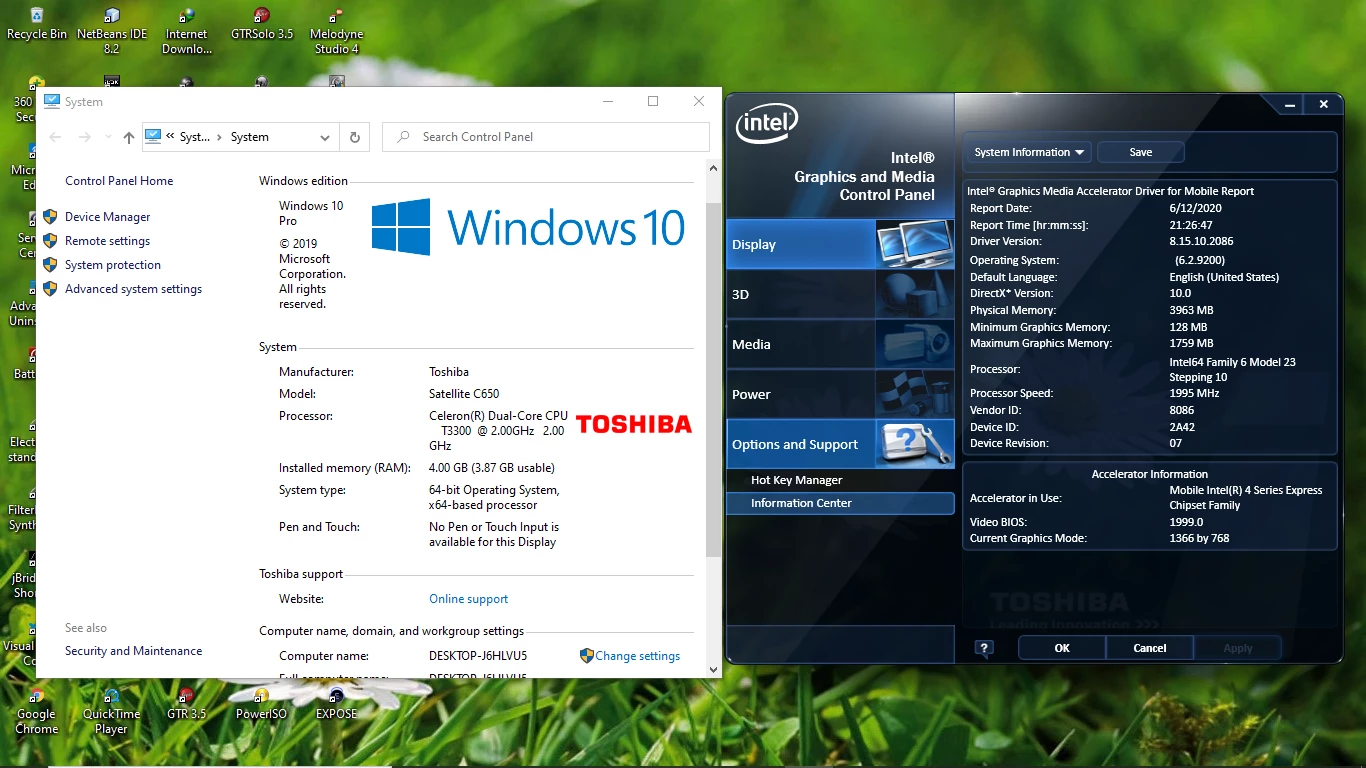

    Sorry for the delay in response. If you are still unable to install XD, I'd request you to contact us directly using this link https://helpx.adobe.com/contact.html so that we can take a remote session and check it at your machine level.

    1 reply

    Rishabh_Tiwari
    Legend
    June 3, 2020

    Hi there,


    Sorry to hear about the trouble. Could you please share a few more details like:


    1. Full system specifications including RAM, Operating System version, and graphics card details.
    2. Please share a screenshot of the error that you are getting.


    Regards

    Rishabh

    OnyemachiAuthor
    Participant
    June 3, 2020

    I had I screen shot of it but I will retake it again

    Rishabh_Tiwari
    Legend
    June 9, 2020

    Thanks for sharing the details. We generally get error 195 when the system is not meeting the minimum system requirement to install an Adobe Software. As you mentioned you already updated, could you please try uninstalling the driver and then re-installing it and checking if it has the latest version as per the manufacturer's website. And please share the graphic card details, it will help us isolate the cause.