There's indeed a subtle difference.
On the left:
An image mask created by selecting an image with a shape (on top or below it) will yield an object precisely cropped and positioned as prepared, with much more hierarchically constructed elements. Resizing the shape as a whole will reveal more of the image, but move the contained image around a bit oddly. Nevertheless, you can easily drill down and freely scale, rotate, and move anything around: either the shape, anchor points, content, whatever.
On the right:
Simply dropping an image into a shape creates a structurally simpler shape, with less levels of hierarchy and less options. E.g. the image will initially be inserted with either the height or width in full view (whatever fits first) and positioned centrally. Resizing the masked object as a whole will retain its filling appearance. You can freely move and scale the image within the masking shape, but here comes the strangest difference: try rotating it (numerically) and the rotation will be applied to the whole object !
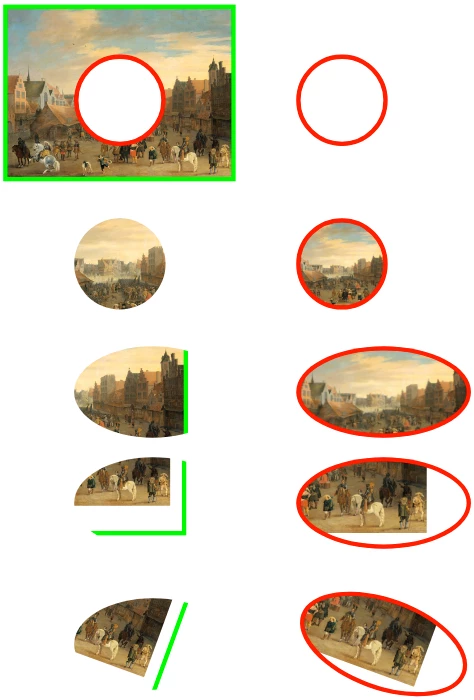
The explanation:
You might have noticed that XD turns any normally imported or dragged image (on the left) already and automatically into a rectangularly masked image (so an image within a rectangular shape). This is achieved by using a similar technique as the "background image" of any kind of container (typically a DIV) in CSS. This method historically has options like fill or fit, scaling and positioning, but no rotation !
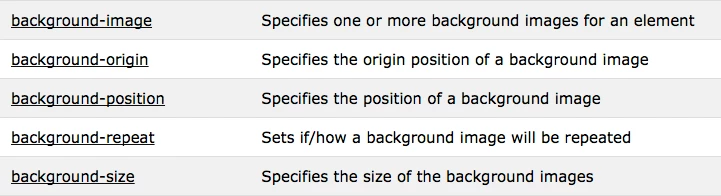
So using your own shape to mask an image actually wraps the image's container into a secondary container, allowing for rotation (a DIV can rotate, a background image can't). And this double-masked construction sure has awkward effect on any (auto)resizing...
The image directly dropped into the shape (on the right) yields no more than just that shape (not necessarily a rectangle), with the image as its background image. So no mask containing another mask. Nevertheless, this masked object behaves differently at first while resizing the shape (because of the filling background behaviour), but allows for a more specific position and size (but no rotation) once you select the image within.
To a front-end developer, the difference between a plain image and an image being shown as a background is very crucial ! The plain image will be part of the relevant content in HTML, but a background image will be processed as appearance in CSS. So text-only readers and many accessibility devices and tools often ignore them, and search engines regard them as less important in search results ranking.
A good UX designer may keep this typical difference in mind, when using images and knowing that decorative imagery will be processed and produced differently than relevant images. But it's not a big deal that XD makes this difference less obvious.



 AdChoices