
Participant
June 14, 2019
Question

Importing .PSD File in XD (Not Working)

  • June 14, 2019
  • 1 reply
  • 957 views

Hi

Yes I know it is as simple as going > File > Import > Select .PSD file or dragging the .PSD into XD using mac but all .psd files are greyed out

I know I can drag in a .svg file but in my case I need to drag in a .psd according to a parallax scrolling tutorial

(Shown here)

Simple Parallax Animation using Adobe Photoshop and XD - YouTube
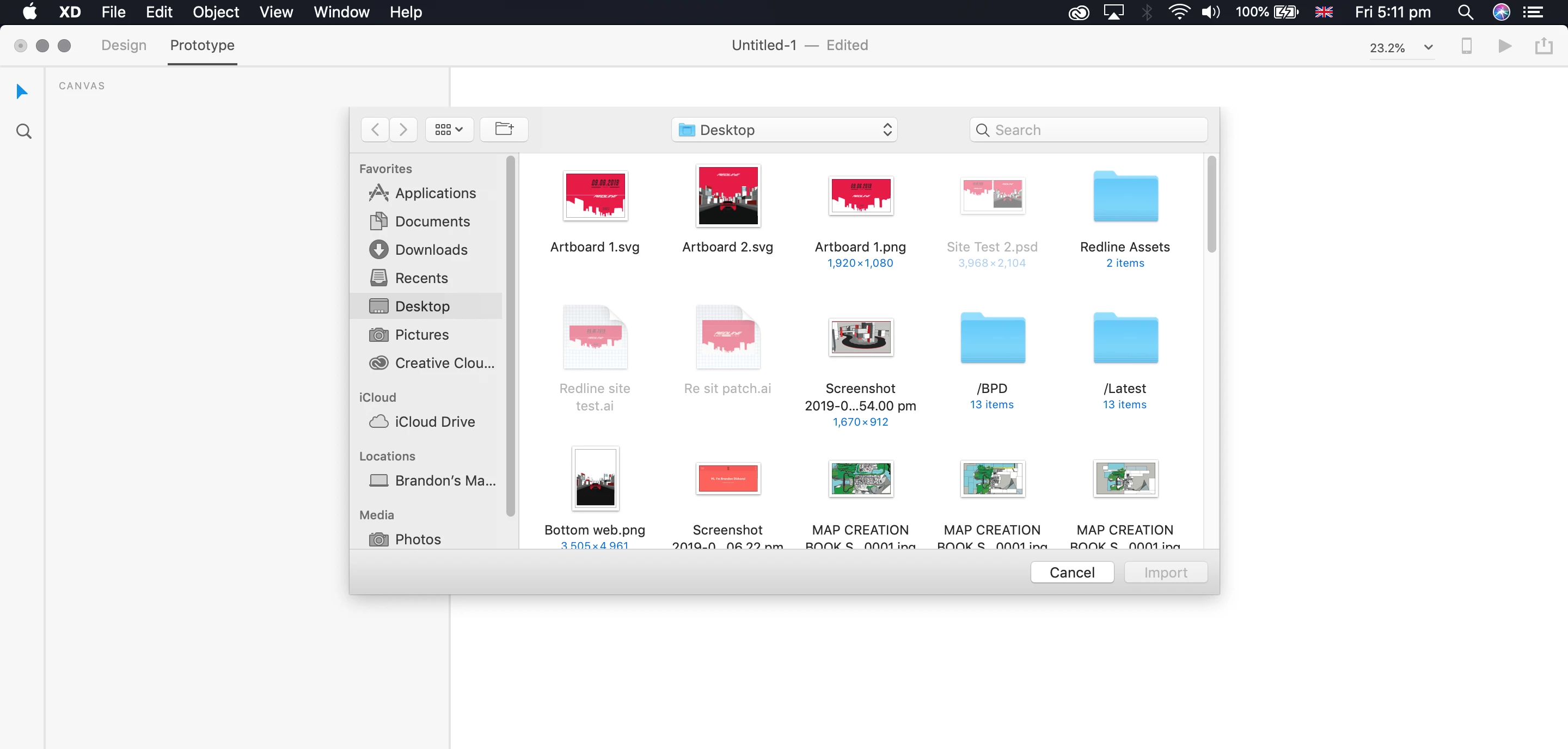
This topic has been closed for replies.

1 reply

Atul_Saini
Community Manager
Community Manager
June 14, 2019

Hi Brandond,

This is a strange behavior, I wasn't able to re-create it at my end. Could you please share the version of macOS which you are using at the moment along with the version of XD?

I'd also request you to try the alternatives mentioned here: - Import different types of assets.​ If the problem still persists, please create a new document and try to import .psd file there. I'd also request you to relaunch XD and check if that works.

Thanks,

Atul_Saini

Participant
November 4, 2021

hi, is there a solution for this problem? i have the same