
In my shared prototype link random visual elements disappear such as shape color fills and lines
Hello Adobe XD friends,
In my shared prototype link, random visual elements disappear such as color fills and lines.
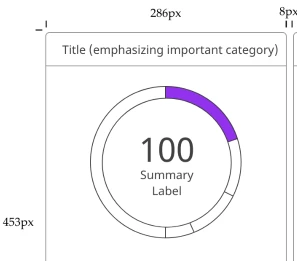
Screenshot from prototype shared link, below:
Some of the horizontal and vertical lines for the specs are missing and most of the color fill for the pie chart is gone.
I've tried the following to troubleshoot:
1) Updating the shared link
2) Creating a new shared link
3) Duplicating the XD file and repeating steps 1 & 2
4) Re-installing the previous version 13.0.12
5) Installing the most up to date version again version 13.1.32.8
6) Restarting my computer
As a temporary workaround to share my file:
- Created PDFs and sharing the link via Dropbox
- Another separate issue, I get the following error message in Acrobat Pro DC:
"The dimensions of this page are out-of-range. Page content might be truncated."
(My current workaround for this error message — splitting the content of a long artboard into two to three artboards and then exporting each separately as PDFs. Then using Acrobat Pro DC to combine the separate PDF files into one document)
Thank you for any help!
Neil
 AdChoices