


Participant
April 17, 2019
Answered

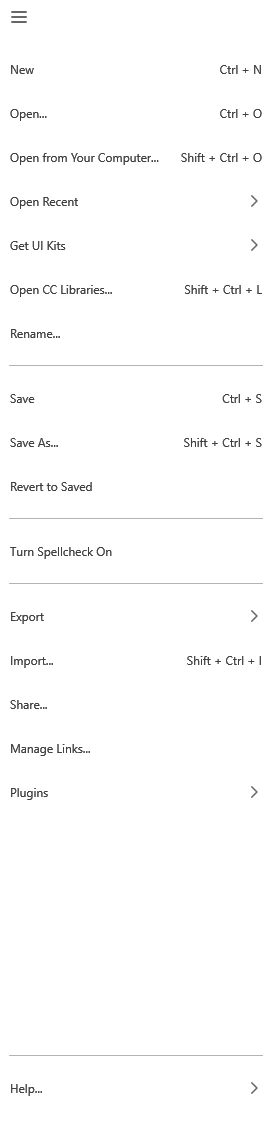
In windows version of XD File/edit/object/view menu elements are not available

  • April 17, 2019
  • 2 replies
  • 4501 views

Hello!

I know theoretically, I should find it under the hamburger menu (this is something that I hate. But practically they aren't here.

Also I have a proposal. Would be great if I could pin frequently used plugins and function to the top (or bottom) of the window. I cannot remember every shortcut, and not too user-friendly find the frequently used things every time under the hamburger menu under the 2nd floor.

This topic has been closed for replies.
Correct answer Harshika Verma

Hi All,


Good News 🙂


In XD 38.0 version, we have the top menu bar in windows as well. Please update to the current version and let us know if you don't see it. We really appreciate your patience.


Thanks,

Harshika

2 replies

Dan Rodney
Community Expert
Community Expert
April 24, 2019

Having only a hamburger menu is the Windows UWP design paradigm that Adobe has chosen to use. You can ready more in their response here. Adobe XD Feedback : Feature Requests & Bugs

As for masking, it should be in the right-click. Make sure you have both things selected (the thing you want to mask, and the shape you want to mask it with) when you right-click on them.

Adobe Certified Expert & Instructor at Noble Desktop | Web Developer, Designer, InDesign Scriptor
Harshika Verma
Community Manager
Harshika VermaCommunity ManagerCorrect answer
Community Manager
March 16, 2021

Hi All,


Good News 🙂


In XD 38.0 version, we have the top menu bar in windows as well. Please update to the current version and let us know if you don't see it. We really appreciate your patience.


Thanks,

Harshika

Participant
March 24, 2021

Worked for me!

Atul_Saini
Legend
April 17, 2019

Hi Gabors,

Thanks for sharing the screenshot and explaining the situation. In Windows, you can just right click on the object and choose actions from there. Here are some steps that may help: - Group, lock, duplicate, flip, and copy objects in Adobe XD.

Kindly update this discussion in case you are having trouble locating any specific functionality, I'd be happy to help.

Thanks,

Atul_Saini

Participant
April 23, 2019

Hello ,with right click you cannot use eg.: mask with shape.

eg . it is missing form every menu

Atul_Saini
Legend
April 23, 2019

Hi Gabor,

Would it be possible for you to share the design specs using this link: - Publish your prototype, design specs, and cloud documents and share it with stakeholders by providing a public or private​? I would also request you to follow the steps mentioned here to mask objects: - Combine objects using Boolean operations and mask objects with shapes in Adobe XD.

Thanks,

Atul_Saini