Participant
February 7, 2020
Answered

Incorrect colour code reflected in the design specs under shared link

  • February 7, 2020
  • 2 replies
  • 2471 views

Hello, I am not sure if this is a bug. 

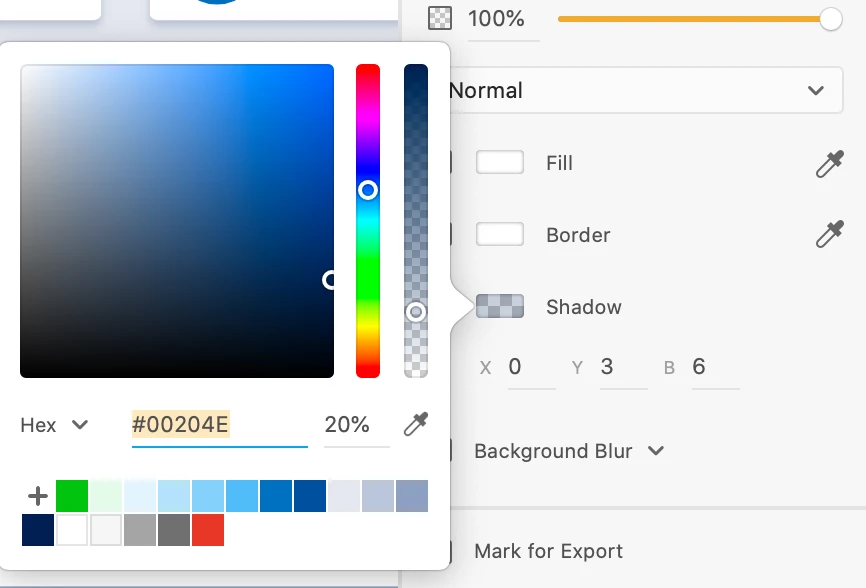
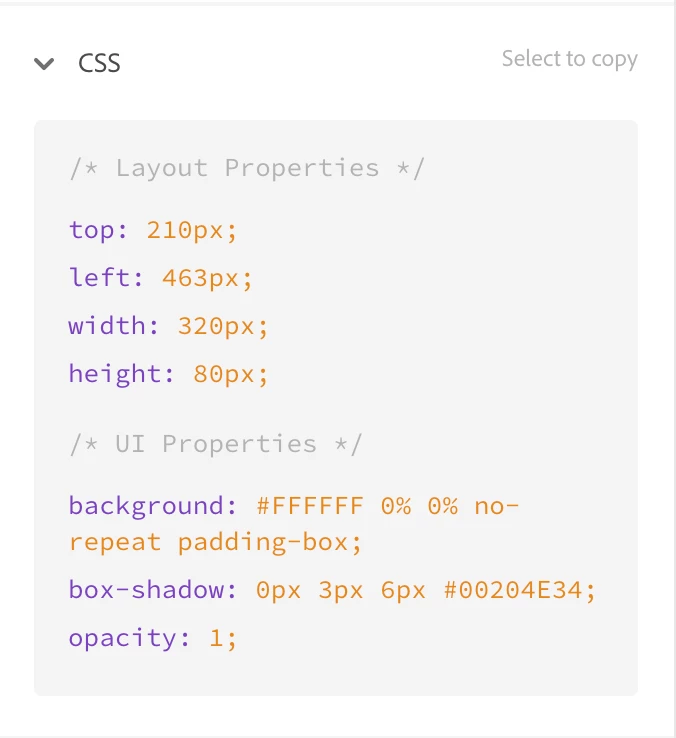
I tried to share my design specs with my developer through the shared link that was generated from XD Share > Development and the colour code (Under box-shadow) was reflected wrongly. There was an additional "34" behind the hex code #00204E. When I went back to my working file to check, the colour code was correct. I also tried to re-input the colour code and update the link again but it still reflect with an additional number at the back. 


Has anyone experience this before? May I know if there is any way resolve this?  Thank you in advance. 

This topic has been closed for replies.
Correct answer raghavendra_nuggu

Hi Kenneth,

 In DesignSpecs web app, you have an option to view the colors in Hex, RGBA and HSLA. You can change the notation the selection the option "RGBA" in the dropdown. If the selected value is RGBA, the color values are displayed in RGBA format.

Thanks & Regards,

Raghavendra

2 replies

Kenneth Kawamoto
Community Expert
Community Expert
February 7, 2020

As a side note,  #RRGGBBAA notation is not supported by Microsoft browsers (and other browsers' old versions) so XD should be using rgba() instead, which is universally supported.

raghavendra_nugguCorrect answer
Participant
February 11, 2020

Hi Kenneth,

 In DesignSpecs web app, you have an option to view the colors in Hex, RGBA and HSLA. You can change the notation the selection the option "RGBA" in the dropdown. If the selected value is RGBA, the color values are displayed in RGBA format.

Thanks & Regards,

Raghavendra

Adobe Employee
February 7, 2020

Hi Charlotee ,


Thanks for writing us,  The addition value that was getting in CSS code   is  "Alpha percentage  in hex value " i.e. 8 digits hex value  .For example hex = #00204E and  Alpha  16%  in XD then in CSS it will 8 digit Hex #00204E29. 

You can refer Alpha percentage in hex value at https://gist.github.com/lopspower/03fb1cc0ac9f32ef38f4 

Please reach out if you have any other concerns.

Regards,

Rajasekhar Reddy.


ShowsuiteAuthor
Participant
February 10, 2020

Hi Reddy, 

Thank you for clarifying! If that's the case, currently my hex value is #00204E and my alpha value is 20%, but it is reflecting as #00204E34 instead of #00204E33 as according to the hex value at https://gist.github.com/lopspower/03fb1cc0ac9f32ef38f4 ? Will it affect if it is 33 or 34 in this case?


Thank you.


Many Thanks,
Charlotte 


Participating Frequently
February 10, 2020

Hello Charlotte,


Thanks for the reply.

 I have tried reproducing the  same with same properties i.e. #00204E and 20% alpha and in the CSS code , got the correct value i.e. #00204E33 , I am just wondering how it was varying  .Could you please try the same values on other object and let us know the result .If possible share the file for which this issue  was occurring .


Regards,

Rajasekhar Reddy.