Participant
Apr 12, 2021 10:10 PM UTC
Answered

Is there a Select Highlighted Feature that you know of or am I crazy?

I am trying to select an IOS12 (Iphone 😎 Status Bar Component that Ive had across an old document to replace it with an IOS14 Status Bar for Iphone 12 and i realized that im able to Highlight the instances of that across all my artboards but im not able to select them. Is there a workaround for this or something thati havent seen? 


Let me know!!

This topic is closed to new replies. Start a new post to keep the conversation going.
Harshika Verma
Harshika VermaCorrect answer
Community Manager
Apr 13, 2021 5:07 PM UTC

Hi there,


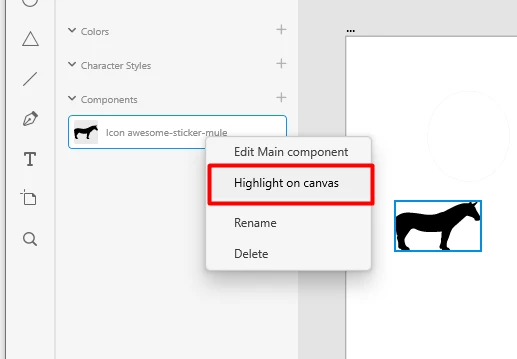
Thank you for reaching out. If you want to highlight an asset on your arboard. You can highlight them using the "Highlight on canvas option" which will automatically select the object on the artboard. Please see the image below-


Please let me know if this is what you're looking for. We will try our best to help.


Thanks,

Harshika

1 reply

Harshika Verma
Community Manager
Harshika VermaCommunity ManagerCorrect answer
Community Manager
Apr 13, 2021 5:07 PM UTC

Hi there,


Thank you for reaching out. If you want to highlight an asset on your arboard. You can highlight them using the "Highlight on canvas option" which will automatically select the object on the artboard. Please see the image below-


Please let me know if this is what you're looking for. We will try our best to help.


Thanks,

Harshika

Translate