Participant
March 27, 2023
Answered

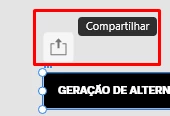
Is there a way to turn off the 'Auto Publish' indicator above artboards?

  • March 27, 2023
  • 3 replies
  • 465 views

Have been hating this feature since it got implemented. And it's so easy to missclick it happens very often.



    This topic has been closed for replies.
    Correct answer perihan

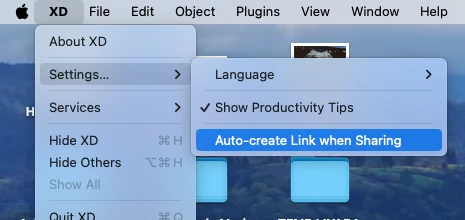
    You can't actually hide that icon, but, as Spas K. said you can disable auto link creation. On macOS, though, you need to: 

    -> click on the XD icon -> Settings -> Auto-create link when sharing (uncheck it)


    3 replies

    perihan
    perihanCorrect answer
    Participant
    January 10, 2024

    You can't actually hide that icon, but, as Spas K. said you can disable auto link creation. On macOS, though, you need to: 

    -> click on the XD icon -> Settings -> Auto-create link when sharing (uncheck it)


    HARSHIKA_VERMA
    Community Manager
    Community Manager
    March 27, 2023

    Hi @alexandres72700242,


    Thank you for reaching out and sharing your feedback. In addition to what our expert has suggested, you may also submit your feedback on our XD UserVoice page, which gives visibility to your requests to our product team.


    Please share the link to your request here so that our future customers can also upvote a similar request.


    Thanks,

    Harshika

    Spas K.
    Community Expert
    Community Expert
    March 27, 2023

    Hey there! The only thing you can do is to disable the automatic link creation. It will still create a new flow when you click it, but it will not generate a new prototype link.


    Make sure it's disabled, like that:


    Unfortunately, Xd's preferences are quite basic, so we don't have much control over how the interface functions.