loucass31997555
Participant
Mar 21, 2019 8:24 AM UTC
Answered

Issue Opening Adobe XD (Your developer license has expired. To continue to use this app, please renew your license.)

Hi can anyone help with this > I got this error today after opening XD once I tried to open it again and receive a license expired Popup saying  ("Your developer license has expired. To continue to use this app, please renew your license.") Please note my creative cloud license is up to date and there doesn't seem to be any issues with my account. thanks

This topic is closed to new replies. Start a new post to keep the conversation going.
Preran
PreranCorrect answer
Legend
Mar 26, 2019 10:04 PM UTC

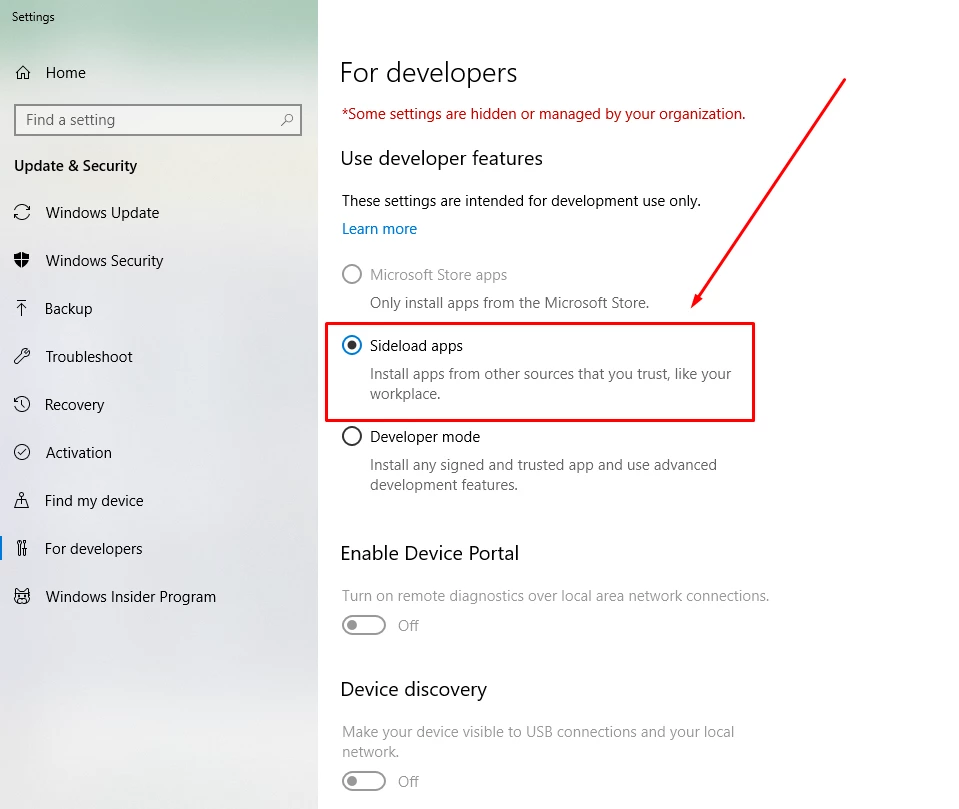
Can you try enabling side loading of application as described in the screenshot below? Let us know of it helped.

76 replies

Participant
Jun 21, 2019 9:25 AM UTC

this warning comes up when selecting the option you suggested. did i download a developer version by accident? how can i avoid sharing this data?

Translate
Participant
May 1, 2019 7:18 PM UTC

Hey! Thank you, there was similar error for Acrobat Pro DC to launch and this setting change did resolve that either. Bravo!

But to reach to this window was bit of a task.. here is how I did it.

Go to Windows settings option (gear icon  at the start button side panel) Type on the search bar on top "For developers" the option auto popped up for "For Developers Settings" came up, clicked on it and got to this this window.

Thanks much again. Hope this helps.

Translate
Participant
May 30, 2019 3:21 PM UTC

This worked. The "For Developers" section is hidden on my Windows 10 Home OS version. So go to "Settings" and search for "For Developers" and you can find the screen there. And then enable the "Sideload apps" setting. And Bingo!

Translate
loucass31997555
Participant
Mar 27, 2019 11:56 AM UTC

Thanks for the help everyone , XD ended up working again after re-installation

Translate
Preran
PreranCorrect answer
Legend
Mar 26, 2019 10:04 PM UTC

Can you try enabling side loading of application as described in the screenshot below? Let us know of it helped.

Translate
avaph
Participant
Mar 27, 2019 1:52 AM UTC

Hi Preran and everyone facing the same issue,

This worked! Thank you!

Translate
sjorsp68900097
Participant
Mar 26, 2019 5:09 PM UTC

Same here, problem occurred today. Let me know if you found a fix.

What I tried so far and doesn't work:

- Relogging CC

- Restarting PC

- Going back 1 update

- Re-installing XD

Translate