


Guna Chandar
Participant
August 26, 2020
Answered

Issue while using measuring tool

  • August 26, 2020
  • 1 reply
  • 437 views

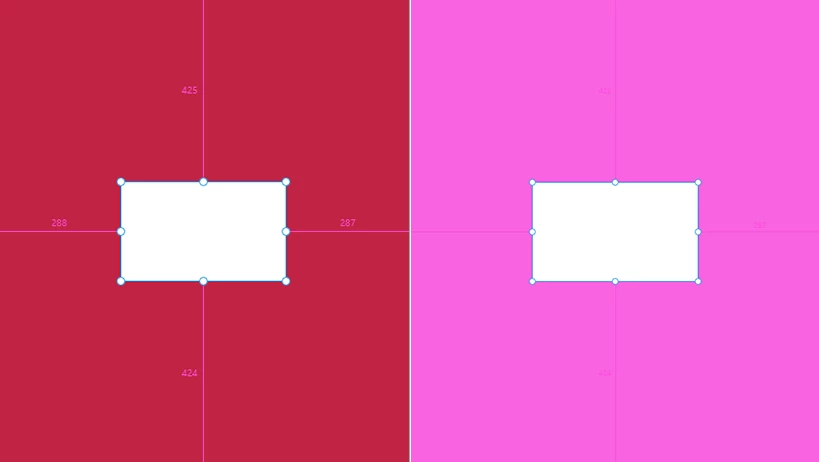
Pink is the color shown when we try to calculate the value (width & height) of an object inside the artboard. So if our background color was also the same color pink. Then, there will be distraction for us to calculate the values of the object. Because, both the artboard and the measuring line value color is same.

    This topic has been closed for replies.
    Correct answer Rishabh_Tiwari

    Hi Guna,


    Thanks for reaching out. I am afraid, as of now we don't have an option to change the grids color. However, we have received a similar request on Adobe XD UserVoice page, I'd request you to please upvote this request:https://adobexd.uservoice.com/forums/353007-adobe-xd-feature-requests/suggestions/32027872-different-color-guide-on-pinkish-background-color


    This is the best way of communicating with the Engineering and Product Management teams regarding issues and suggestions so they can be implemented in future releases. 


    Regards

    Rishabh

    1 reply

    Rishabh_Tiwari
    Rishabh_TiwariCorrect answer
    Legend
    August 26, 2020

    Hi Guna,


    Thanks for reaching out. I am afraid, as of now we don't have an option to change the grids color. However, we have received a similar request on Adobe XD UserVoice page, I'd request you to please upvote this request:https://adobexd.uservoice.com/forums/353007-adobe-xd-feature-requests/suggestions/32027872-different-color-guide-on-pinkish-background-color


    This is the best way of communicating with the Engineering and Product Management teams regarding issues and suggestions so they can be implemented in future releases. 


    Regards

    Rishabh