
Inspiring
March 7, 2018
Question

Layer grouping

  • March 7, 2018
  • 1 reply
  • 651 views

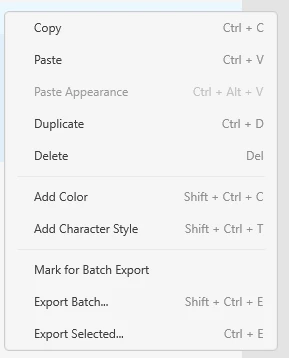
"To group layers, multiselect layers, right-click, and pick Group from the context menu."

Ref. How to use layers to organize objects in Adobe XD.

I have no such option. Here I have five layers multi selected an this is my context menu. I'm using Windows 10. YES, latest build.
    This topic has been closed for replies.

    1 reply

    Randy Edmunds
    Adobe Employee
    Adobe Employee
    March 7, 2018

    Thanks for reporting this. We need to update the documentation, but the Ctrl+G shortcut to Group will still work.

    Regards,

    Randy

    perrybrusAuthor
    Inspiring
    March 7, 2018

    So does this mean there's no UI specific action method to group layers and only that shortcut? I'm not at my W10 workstation right now, but I'll have a go at selecting multiple layers and then hit Ctrl+G when I get back. However, I hope your not planning to introduce a shortcuts only strategy?

    Randy Edmunds
    Adobe Employee
    Adobe Employee
    March 7, 2018

    I mainly wanted to let you know that you can always Ctrl+G to Group.

    After looking more closely, I'm not sure how you got into that state. Can you provide a larger screen shot that includes entire XD app?

    Thanks,

    Randy