
Participating Frequently
September 12, 2022
Answered

Layer in the back still overlaying

  • September 12, 2022
  • 2 replies
  • 568 views


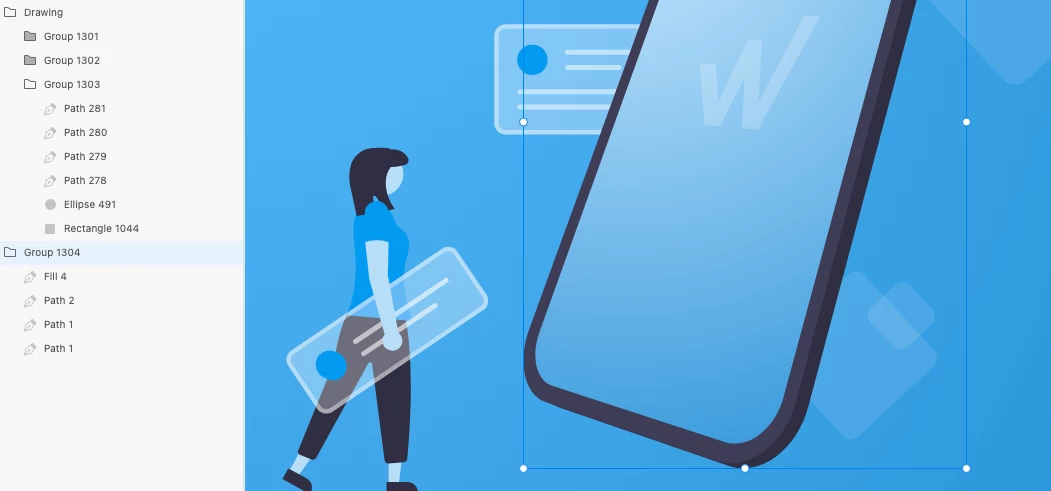
Look at the image below. The phone should be showing underneath the other elements, but its still overlaying. This is so essential, but is still broken. How can you deploy such a broken build? 


XD is so bugged on basic behaviour, I am forced to migrate to Figma/Sketch. It used to work great, but similar to Illustrator and Photoshop, all good things have to be ruined by Adobe... 
 

This topic has been closed for replies.
Correct answer Kenneth Kawamoto

Does the phone have a positive z value (3D transformation)? If so it appears on top of other elements with lower z value (or no 3D transformation).

2 replies

Kenneth KawamotoCommunity ExpertCorrect answer
Community Expert
September 12, 2022

Does the phone have a positive z value (3D transformation)? If so it appears on top of other elements with lower z value (or no 3D transformation).

Saro GFXAuthor
Participating Frequently
September 13, 2022

Thank you, that fixed indeed the issue. Although I think that if you disable the 3D box, it should also reset the z-index. Especially since Cmd+T is such a easy shortcut to hit accidently. 

Community Expert
September 13, 2022

I agree with that.

I hit Cmd + T often unintentionally - because it's a Photoshop shortcut for free transform 😆

AkinGn
Community Expert
Community Expert
September 12, 2022

Hi @Saro GFX, have you checked the z-index property on the right side panel, under the "Transform" section? The only explanation for that would be the underneath layer's z-index to be bigger than the ones in the layers above. Hope this helps!