


Participant
December 14, 2022
Question

Library sections are cut off

  • December 14, 2022
  • 2 replies
  • 1101 views

Hi there,

I've been noticing with XD that my library sections have been cut off.
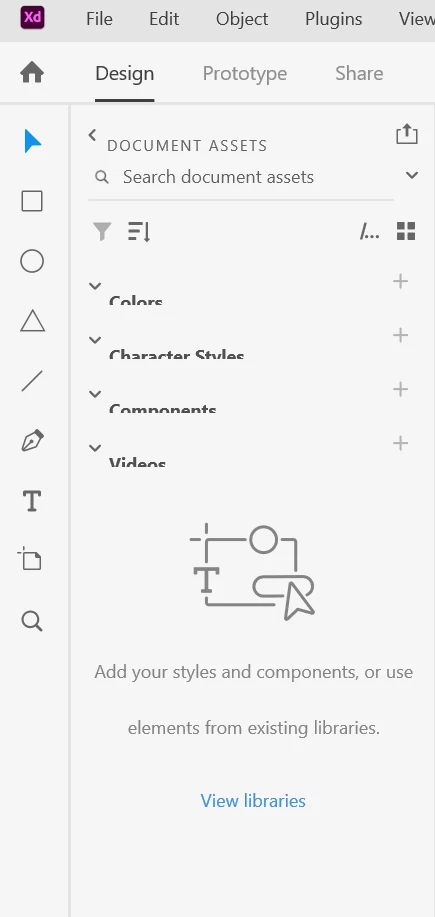


Display drivers are up to date, and I tried reinstalling the latest version of XD. Yet the problem persists. I'm finding every menu option in that menu has the text cut off. Regardless of the screen, resolution and size of the window.

Using the Creative Suite on Windows 10 Pro, and the issue has been replocated on two external 1080P screens, a 4K external display, and on the Laptop's built in display.

Here's another user's experience with the same issue:
Library titles are cut off - Adobe Support Community - 12308681

I'm wondering if there is anythign I can do to resolve this issue, or if it's something that needs to be patched?

Thanks.

This topic has been closed for replies.

2 replies

Participant
May 29, 2023

I recently downloaded the adobe XD on my laptop with win10, 
I am having problem with visibility of the component panel's section such as "Colors", "Character Styles",

"Components", "Videos" these titles are not clearly visible 
I also attached the image for reference does anyone know how to fix this problem.

HARSHIKA_VERMA
Community Manager
Community Manager
June 8, 2023

Hi @Rutwik301403354e8m,


Thank you for reaching out, and sorry for the delay in response. This is a known bug in XD, and the team is investigating it. There is a similar discussion that happened in the past here: https://community.adobe.com/t5/adobe-xd-discussions/library-sections-are-cut-off/td-p/13420156.


If needed, we may reach out to you for additional details to aid in the investigation process. We understand the importance of keeping you informed, and we will provide updates on the bug fix as soon as we have more information.


Thank you for your patience and understanding.


Thanks,

Harshika

HARSHIKA_VERMA
Community Manager
Community Manager
December 26, 2022

Hi @Conor27571782dnrk,


Thank you for reaching out, and sorry for the trouble. Would you mind telling us the version of XD installed on your machine? I checked the previous bug, which was resolved.


I assume it to be a regression in the latest version. Does that happen with other applications like Photoshop or other Adobe apps?


I will check the same with the team for investigation.


Thanks,

Harshika

abualihan
Participant
January 19, 2023

it only appeared in XD. 

I have XD 55.2.12 now and I tried XD 55.1.12 and 55.0.12 and 54.1.12. the issue appeared on all of them on different screens.


HARSHIKA_VERMA
Community Manager
Community Manager
January 21, 2023

Hi @abualihan,


Sorry for the trouble, and thanks for testing on the previous version of XD as well. Is it possible for you to share the XD file having issues? If yes, please upload the file to a shared location such as CC or Dropbox and share the URL with me.


We will try our best to help.


Thanks,

Harshika