


Inspiring
February 20, 2020
Question

Linear gradient not imported to XD

  • February 20, 2020
  • 6 replies
  • 6706 views

Hi,

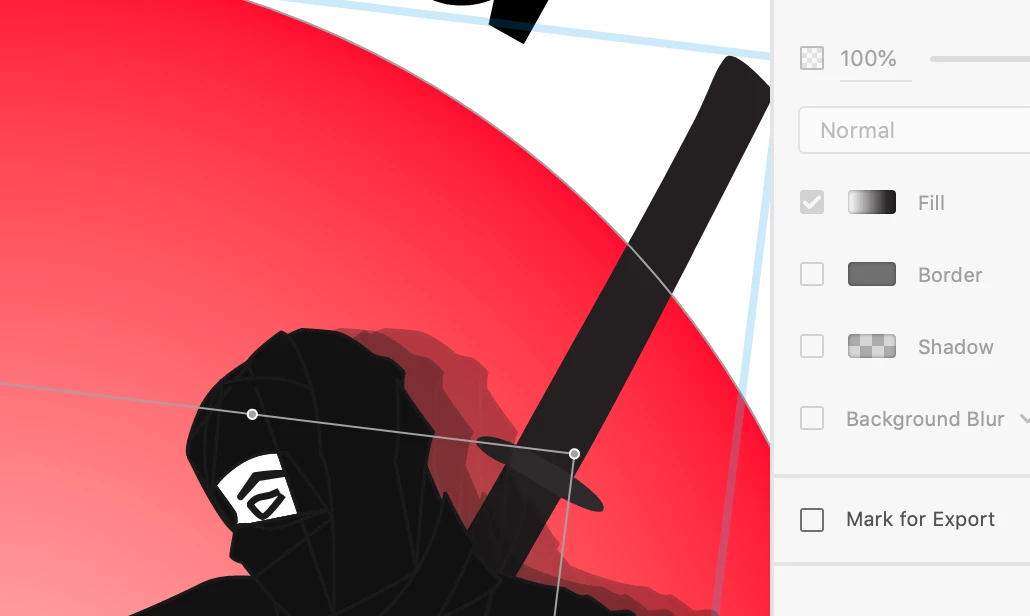
I am running into a problem importing an AI graphic to XD. The radial gradient is imported, but the linear gradient is displayed as solid color, although in the inspector on the right siede side the fill says gradient. It is supposed to be in the sword.

Does anybody know ho to fix this?


Thank you!


Frida
This topic has been closed for replies.

6 replies

AtuyL
Participant
September 18, 2021

hello.
I can't explanation for below effect
.

But i find this process is resolve the this issue.


step1: Object -> Live Paint -> Make
step2: Object -> Live Paint -> Expand


If you can write ExScript, the following may also be useful.

 
app.executeMenuCommand("Make Planet X")
app.executeMenuCommand("Expand Planet X")
 
thank you. (  | _ | )v
Participant
March 27, 2023

Thank you so much @AtuyL . It worked like a charm\

DanielBlazquez
Inspiring
November 5, 2020

I have the same problem. I tested it with a simple figure and the result is the same. I hope they solve it soon, because it is quite annoying.


Peter Villevoye
Community Expert
Community Expert
November 5, 2020

Your problem is not the same, because importing or pasting elements with linear or radial gradients into XD work fine !! So there must be something strange with your sample... 

When copying/pasting doesn't seem to work, then check this setting in the Preferences (it's in Dutch, but I hope tou can find and verify it). It defines what is brought over by the clipboard:

DanielBlazquez
Inspiring
November 6, 2020

Hi Peter. I have the same settings. It is a clean file from Illustrator and XD. It stopped working when updating to v25. 


PD: There is a new version. Let's cross our fingers and see if it has been fixed.

Cultural_Infusion
Participant
October 26, 2020

Same issue here.

I tried the compound solution but it didn´t work, maybe because i have a gradient go through different shapes (letters).
The quick solution I found was to save the vector as SVG, on a different file.
Dragged the SVG into my XD composition and it worked.

SkillNation
Known Participant
February 20, 2020

I also have this issue time to time, normally helps to switch to radial gradient in XD and then back to linear and after that normally you can see all gradients colors

Frida2017Author
Inspiring
February 20, 2020

Oh! Thank you! I will definitely try that 🙂


Frida

Participating Frequently
September 29, 2020

Experiencing the same problem and here's how I solve it for now..

Here's how it look on Adobe Illustrator. Here's how it looked on XD when pasted / imported.


Make sure to compound path gradient elements in your illustration. I asure you it works.. Here a link on what are compound paths. (It's easy as right clicking and making it a compound path)


Here's how it look on illustrator when I make the gradient shape to a compound path.
Right click then press Make Compound Path


After that try pasting on XD it should work 100% .. I got this solution while exploring on XD on how to truly save this because I have an urgent project in UI UX xD.

Monika Gause
Community Expert
Community Expert
February 20, 2020

Did you move the gradient around inside the shape? Can you show the complete object with visible gradient annotator in Illustrator?

Frida2017Author
Inspiring
February 20, 2020

Hello Monika,

yes, I did. I will attach the screenshot. Thank you!


Frida

Monika Gause
Community Expert
Community Expert
February 20, 2020

I'm not sure if Xd supports moving around a gradient like you can do in Illustrator.

So can you try if it's possible to achieve the sane with just using the gradient panel, the rotate angle and the gradient stops?

Peter Villevoye
Community Expert
Community Expert
February 20, 2020

I've tried pasting and importing two elements with linear and radial gradient, and they both work fine. So there must be someting intricate in the content you've created. Any weirdly grouped or compound element, a funky clipping mask, or a transparancy mask in it, not doing anything else but unnecissarily increasing the complexity ?


Frida2017Author
Inspiring
February 20, 2020

Hi Peter,

thank you so much for replying. No, nothing fancy like clipping masks or so. Just that the linear gradient is angled and not vertical. I tried the unite tool in the pathfinder before exporting the asset, as somebody in this forum suggested and that worked miraculously. Obviously angled gradients are not expeorted/ imported properly otherwise. Weird?! 

Thank you!


Frida

Peter Villevoye
Community Expert
Community Expert
February 20, 2020

I just tested an angular linear gradient and it still worked fine, both as a Paste and an Import. So there must be something else at play here...