Participant
March 30, 2023
Question

link a button to nested component on same page

  • March 30, 2023
  • 1 reply
  • 209 views

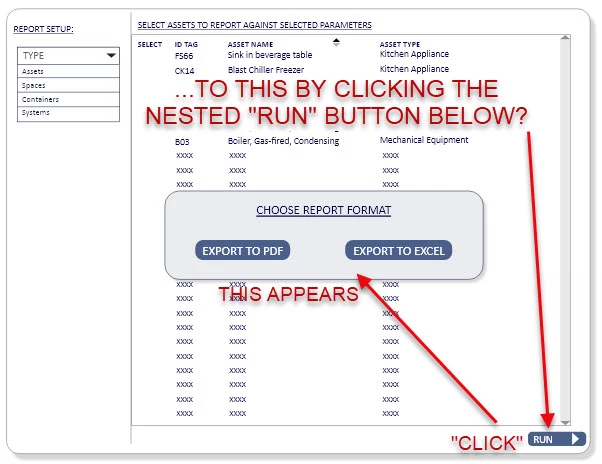
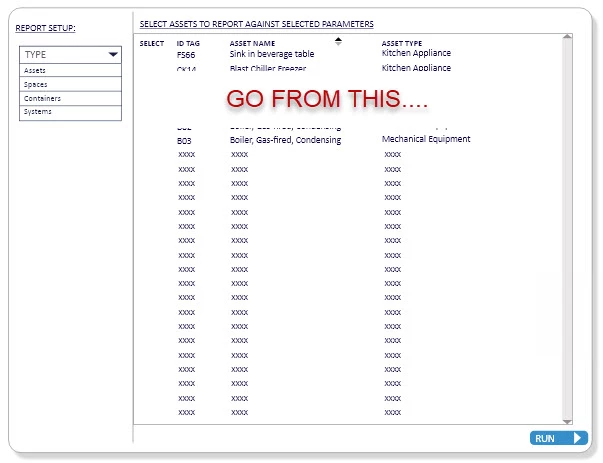
I am wondering if anyone can point me to a "how-To" on a task.  I've creatd a component which steps through selecting items in various states. The last "step" is that when I select the button within the component I want it to have a nested box component to appear.  I have set the state of this box to be "blank" as a default and a hover state where it appears.


I cannot figure out how to wire the button to make the box appear when the user clicks the box? Any workflow for this?  This is a web-based app protoype - not a mobile device.

Perhaps nesting the components is not the way to go?
  

    This topic has been closed for replies.

    1 reply

    Spas K.
    Community Expert
    Community Expert
    March 30, 2023

    Hey there! I'm a bit confused. This second image, where the popup appears - is this another state in the big component? Is everything on your images within one big component, including the popup and the "run" button?


    It can all be done, just not sure where the issue you are running into is exactly? It can be done with nesting components, or it can be done using an overlay which will be on a different artboard. Depends on what you need.


    If you can provide the prototype link and the .xd file as well, that would be great. (the forum doesn't like .xd files, you can upload it somewhere and post the link). If you don't want to share it publicly, feel free to send it to me via PM as well.